KDS for Restaurants: What a Kitchen Display System Does, & When Paper KOT Stops Working
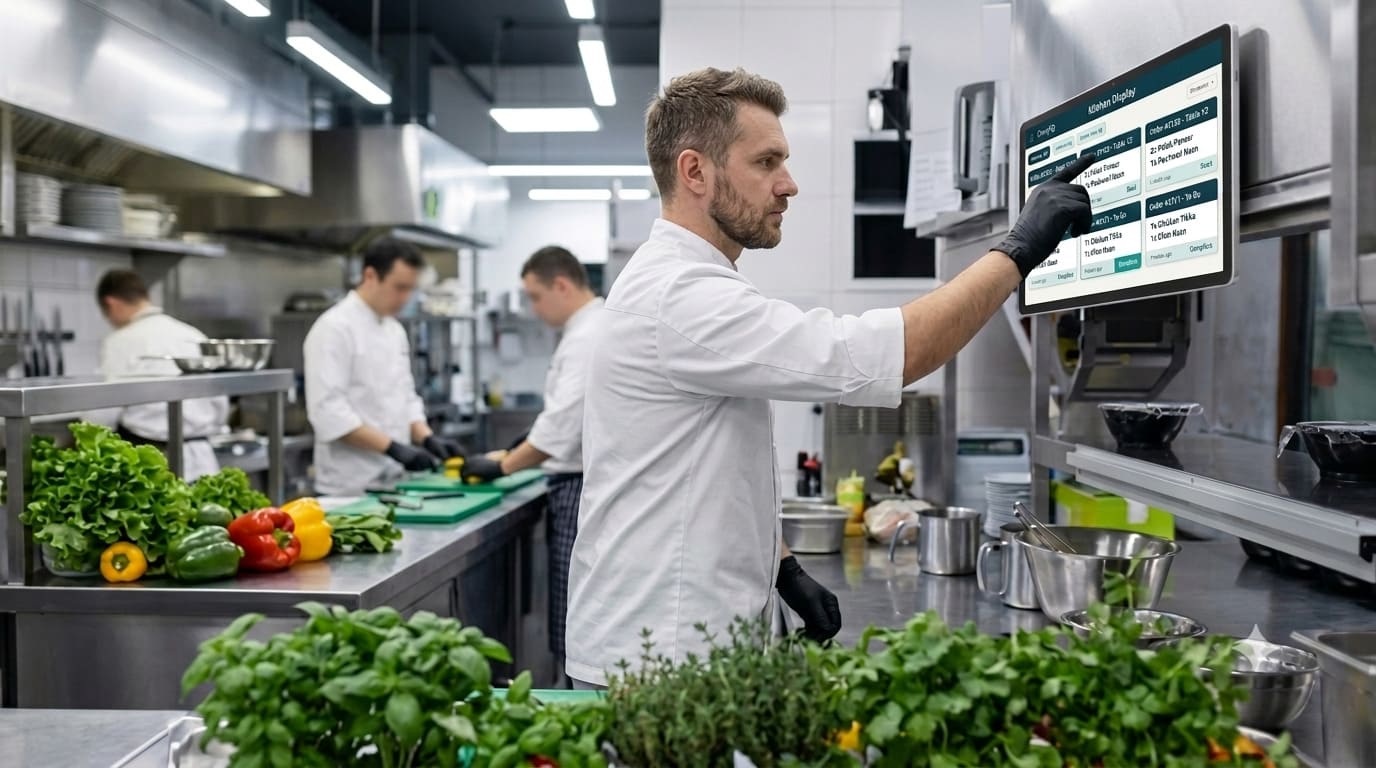
Why restaurants are moving from paper KOT to a KDS
Your kitchen lost an order last Saturday. You just don't know which one.
Somewhere between the printer and the tandoor, a slip went missing. A guest waited. Nobody wrote it down.
8:40 pm. Table 6 orders paneer tikka, dal makhani and four butter naan. The KOT prints, someone tears it off, and it goes on the rail with eleven others. Twenty minutes later the paneer tikka comes out — twice, because the waiter asked again and a second slip got printed. The naan never comes. Table 6 waits 34 minutes for bread.
Nobody did anything wrong. A small piece of paper got lost in a hot, loud room. That's the problem a KDS fixes.
KDS means kitchen display system: a screen in your kitchen that shows orders instead of printing them. The waiter punches the order. It shows up on the right cook's screen with the table number and the time. The cook taps it when it's ready. The waiter knows.
Most guides stop there. This one answers the harder questions about a KDS restaurant setup: do you need one, what does it really cost, and what should you check before you pay?
I build one of these, so I'm not neutral. But I'll tell you straight when paper KOT is the better choice — which is more often than sellers admit.
Want to see a kitchen screen before you read on?
A quick look at real KDS screens makes the rest of this post much easier to picture.
See the CurryIQ kitchen display
What is a kitchen display system?
A kitchen display system is the kitchen side of your POS. The billing counter takes the order. The KDS is where the kitchen reads it.
People mix up two words, so let's clear it up: the KOT is the order, and the KDS is one way to show it. A printer shows the KOT on paper. A KDS shows the same KOT on a screen — with a clock on it.
On a good one, every order is a card with the table number, dishes, special requests like "Jain," where it came from, and a timer. That's all it is: a tablet or TV with a screen that can't get lost.
How does a kitchen display system work?
Four steps.
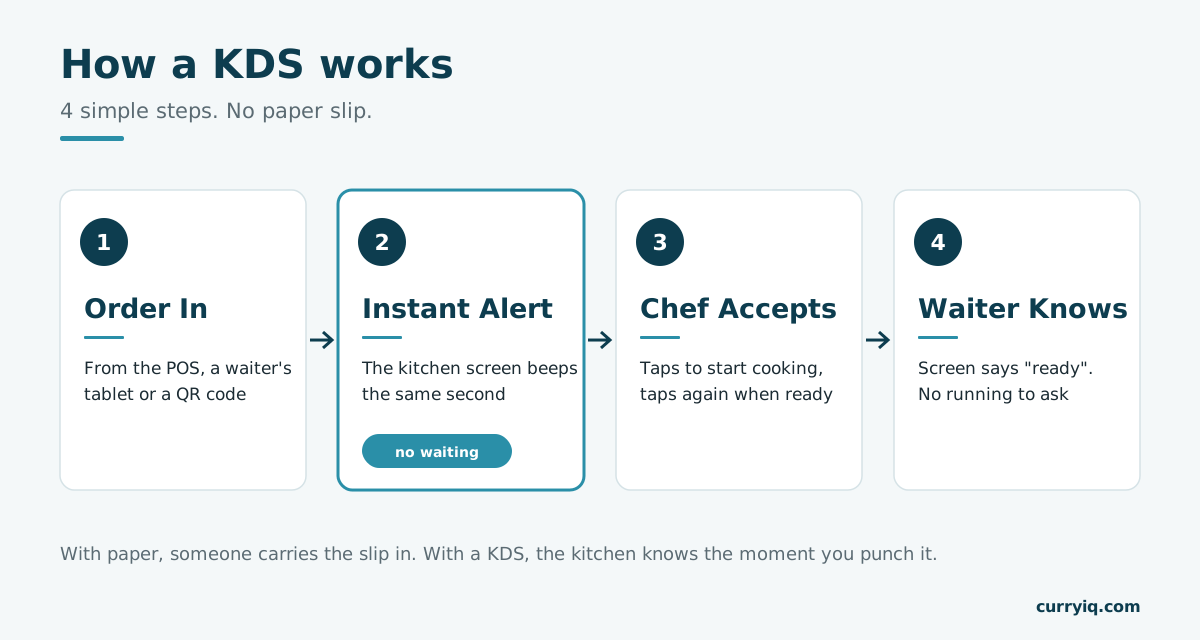
Order in, instant alert, chef accepts, waiter knows. No paper changes hands.
1. Order in. The captain punches it at the POS, a waiter takes it on a tablet, or a guest orders by QR code. (Billing is a separate job — see the billing software guide.)
2. Instant alert. The kitchen screen beeps the same second. Naan goes to the tandoor screen, noodles to the Chinese counter. Each cook sees only their part.
3. Chef accepts. The cook taps to start, then taps again when it's ready. A timer changes colour as the wait grows.
4. Waiter knows. Their screen says "ready." Nobody walks in to ask.
Step 2 is the big one. With paper, the order only reaches the kitchen when someone carries the slip in. With a KDS, it's there in real time.
Paper KOT vs KDS: what really changes
Paper KOT works, and many kitchens run well on it. So let's be honest about where it breaks.
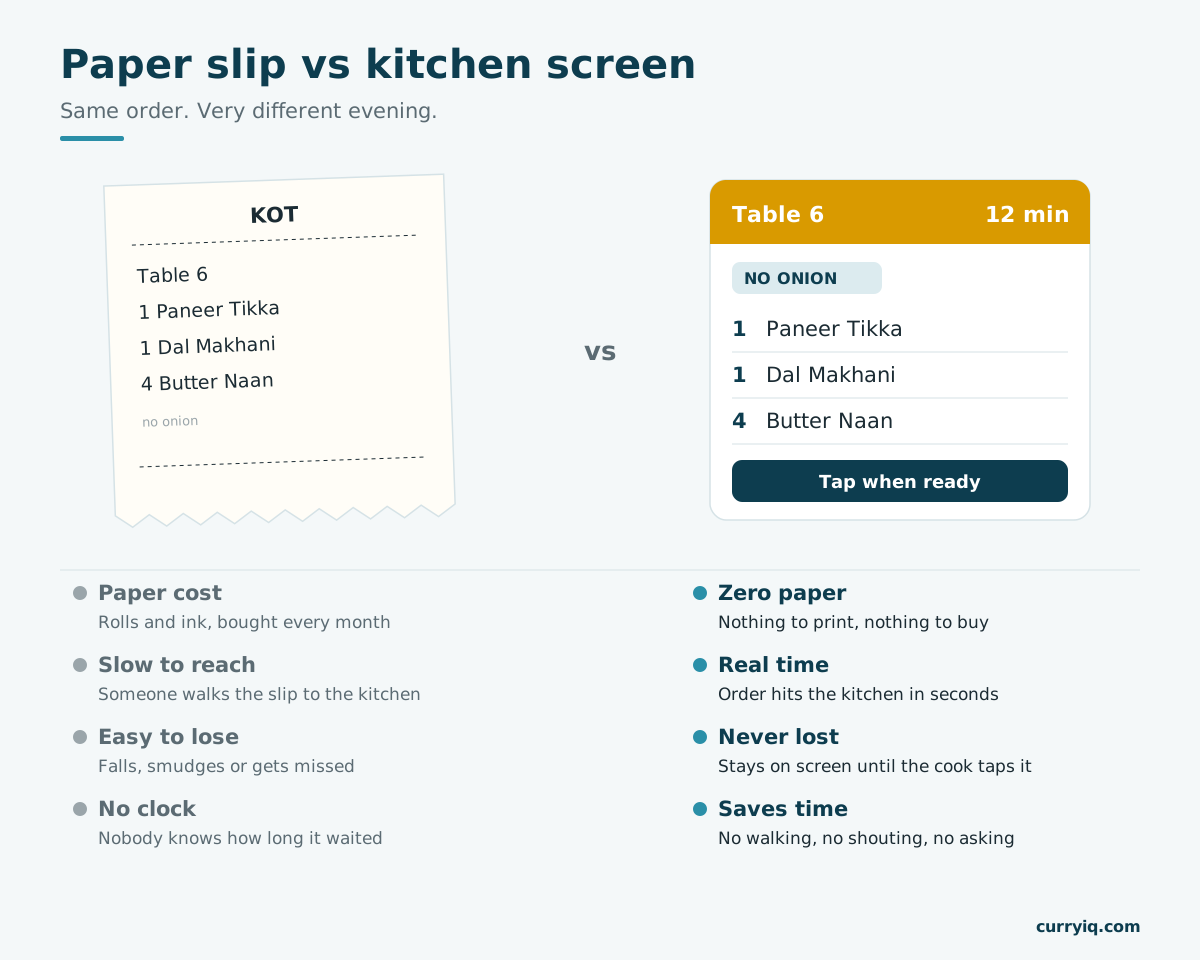
Paper costs money and walks slowly. A screen costs no paper and shows the order in real time.
Paper costs money, every day. Thermal rolls, printer ink, a printer that jams in the rush. Small per slip, but you buy it every month, forever. A KDS prints nothing.
Slips are slow. The order isn't in the kitchen until someone tears it off and walks it over. On a KDS it lands in real time, the second it's punched. No walking, no waiting.
Slips get lost. Under a plate, near the tandoor, in a pocket. A lost slip is a lost dish, and you find out when the guest asks.
Special requests get missed. "No onion" in tiny print near the gravy is easy to miss. A screen shows it in big letters.
Dishes get made twice, or not cancelled. A waiter re-prints because "it's taking long," or the table cancels after the slip went in. Either way, food you paid for with no bill against it.
Nobody knows how long anything took. Paper has no clock. A screen shows the oldest order in red.
Together, on a Saturday night, they decide whether your kitchen keeps up or keeps saying sorry.
Do you really need a KDS?
Honest answer: maybe not.
If one cook at one counter can see every order, stay on paper. A screen won't fix a problem you don't have.
You probably do need one if two or more of these sound like your kitchen:
- Two or more cooking stations — tandoor, Chinese, curry, desserts — make parts of the same order.
- Orders come from many places: captains, QR, takeaway, Swiggy and Zomato.
- A dish gets forgotten or made twice at least once on a busy night.
- Waiters walk into the kitchen to ask "table 6 ka kya hua?" Every trip is a person away from the guests.
One of these is normal. Two or more, and paper is costing you more than a screen would. Only doing delivery? That's a different setup — see the cloud kitchen POS guide.
Not sure if your kitchen is a "two or more"?
Put a screen on just one station for 14 days and see what changes. No card needed, and your printer keeps running alongside.
What a kitchen display system for restaurants in India must handle
Most KDS software was built for burger shops abroad. Indian kitchens need more.
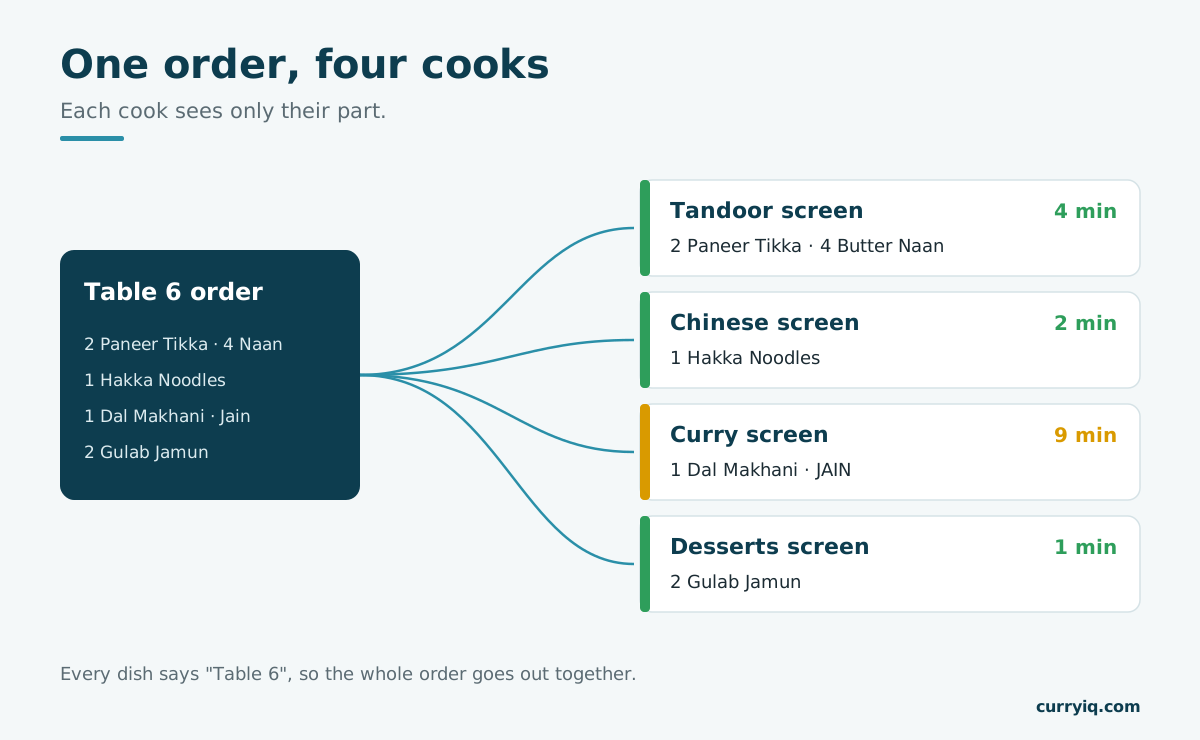
One order, four cooks. Each sees only their part, and the table stays together.
Send each dish to the right cook, but keep the table together. One family order can touch four stations. Each cook should see only their part, but the dal and the naan still need to reach the table at the same time.
Show special requests big. Jain, no garlic, extra spicy. One mistake sends the plate back, so these belong in big letters at the top of the order, not in small print at the bottom.
Show names your cooks can read. If your kitchen reads "दाल मखनी" faster than "Dal Makhani," ask whether the screen can show Hindi or your local language.
Keep working when things go off. Sellers say "it works offline" like it's one thing. It's really three:
- Internet off, Wi-Fi still on. A good KDS keeps working, because orders travel inside your restaurant's own network. Ask for this.
- Wi-Fi router off. Now the billing screen and the kitchen screen can't talk. Check if the printer still prints as a backup.
- Power cut. Everything stops unless your router and kitchen screen are on a UPS. A tablet has a battery; a TV doesn't.
Survive a hot, noisy kitchen. Mount it at eye level, away from the tandoor. Keep the sound on.
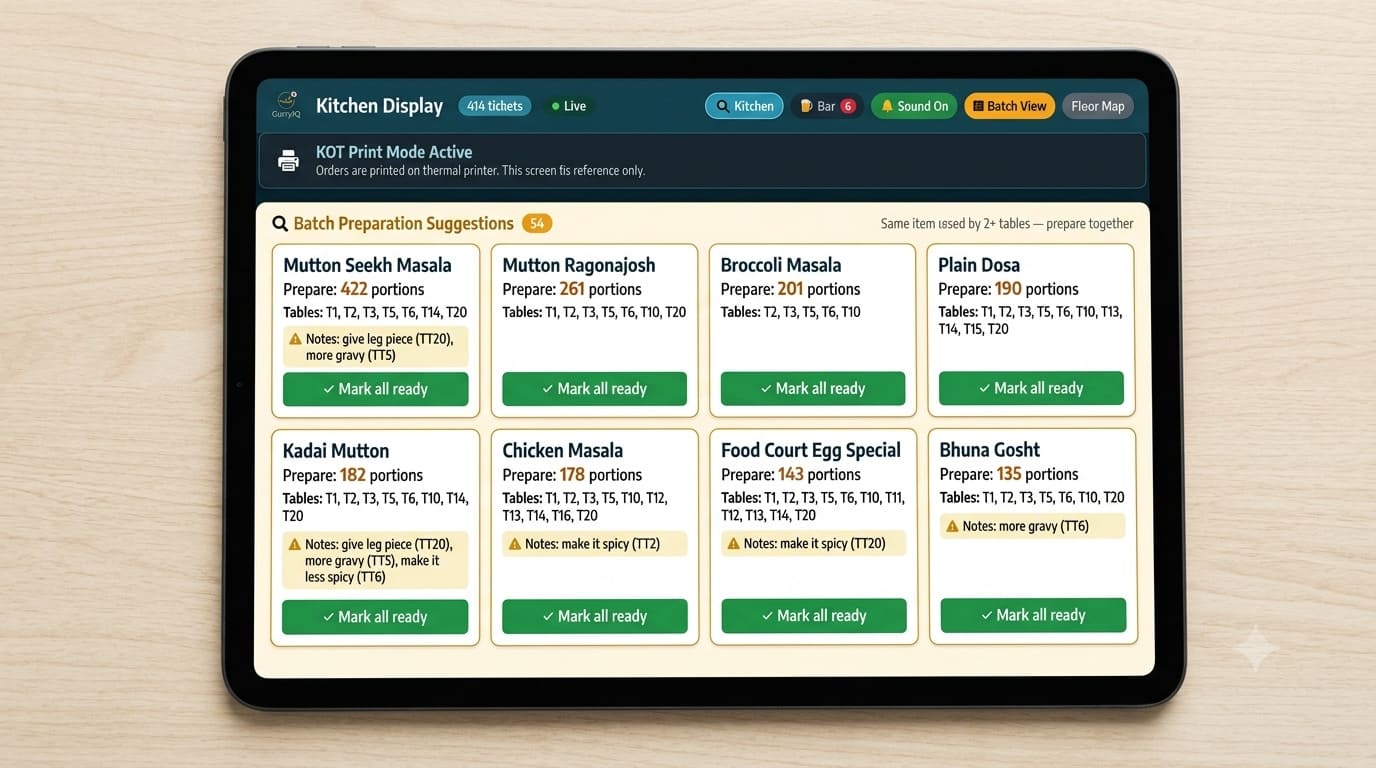
A real station screen: orders in the order they came in, each with the table, special requests and a timer that turns yellow, then red.
What a KDS really costs
Three parts. Most people forget the third.
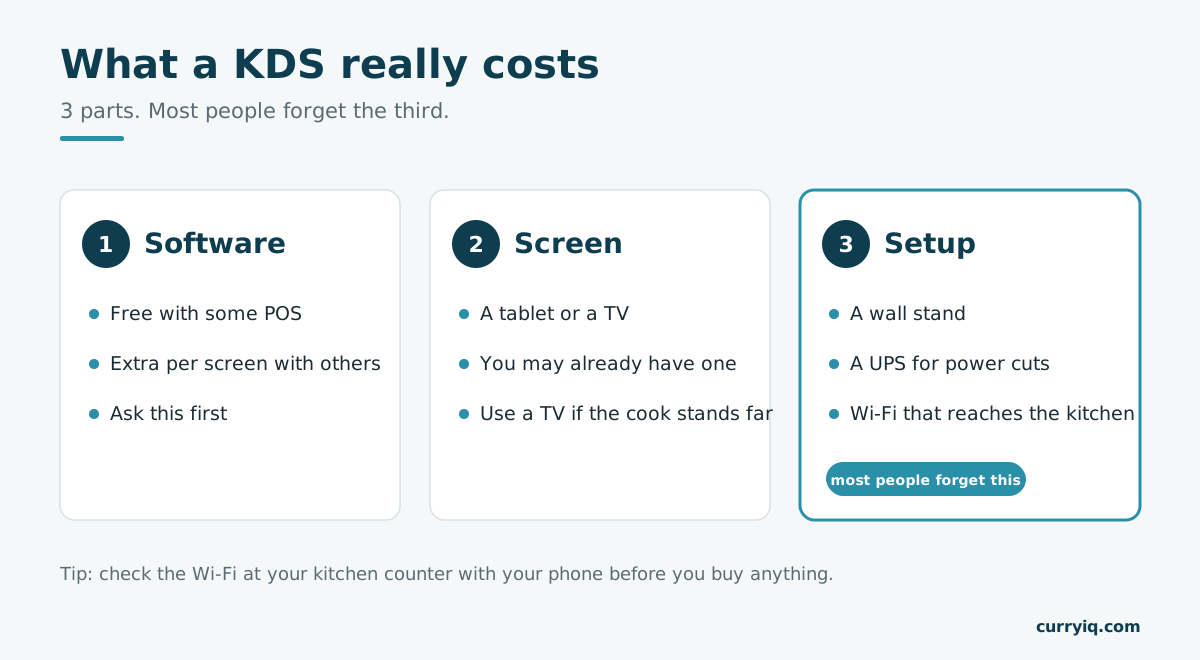
Software, screen, setup. The setup is the part nobody quotes you.
1. The software. Some POS systems include it. Others charge extra for each screen. Ask this first, before you compare anything else.
2. The screen. A KDS that runs in a browser works on an Android tablet, an iPad, a laptop, or a TV with a small device plugged in. You may already have one. A 10-inch tablet is fine if the cook stands close; if they read it from two metres away, use a TV.
3. The setup. A wall stand, so it isn't leaning on the masala dabba. A plug point that isn't shared with the mixer-grinder. A UPS for power cuts. And Wi-Fi that actually reaches the kitchen — check it with your phone at the kitchen counter before you buy anything.
And one cost disappears: no more paper rolls or ink for kitchen slips.
Be careful if a KDS only works on the seller's own machine. Once you've paid for it, it's hard to leave. More on the rest of the setup in POS software for restaurants.
Want to see everything that comes with the POS?
Kitchen screen, billing, QR ordering, stock and reports on one page, so you can compare properly.
The part of a KDS nobody uses: the timer
Every order on a KDS has a start and end time. In a month, that's thousands of records showing how long each dish took.
"The kitchen felt slow on Saturday" is a feeling. "Butter chicken took 16 minutes on Saturday and 9 on Tuesday, and every slow order was stuck at the tandoor" is something you can act on. Put a second person on the tandoor from 8 to 10, or start the naan first. (These numbers are an example to show the idea, not from a real restaurant.)
Aapka KDS time likhta hai. Sawal ye hai ki use padhta kaun hai.
If your KDS throws those times away, it's just a digital paper slip.
Six things to check in any KDS demo
Ask them to show you, live. Including us.
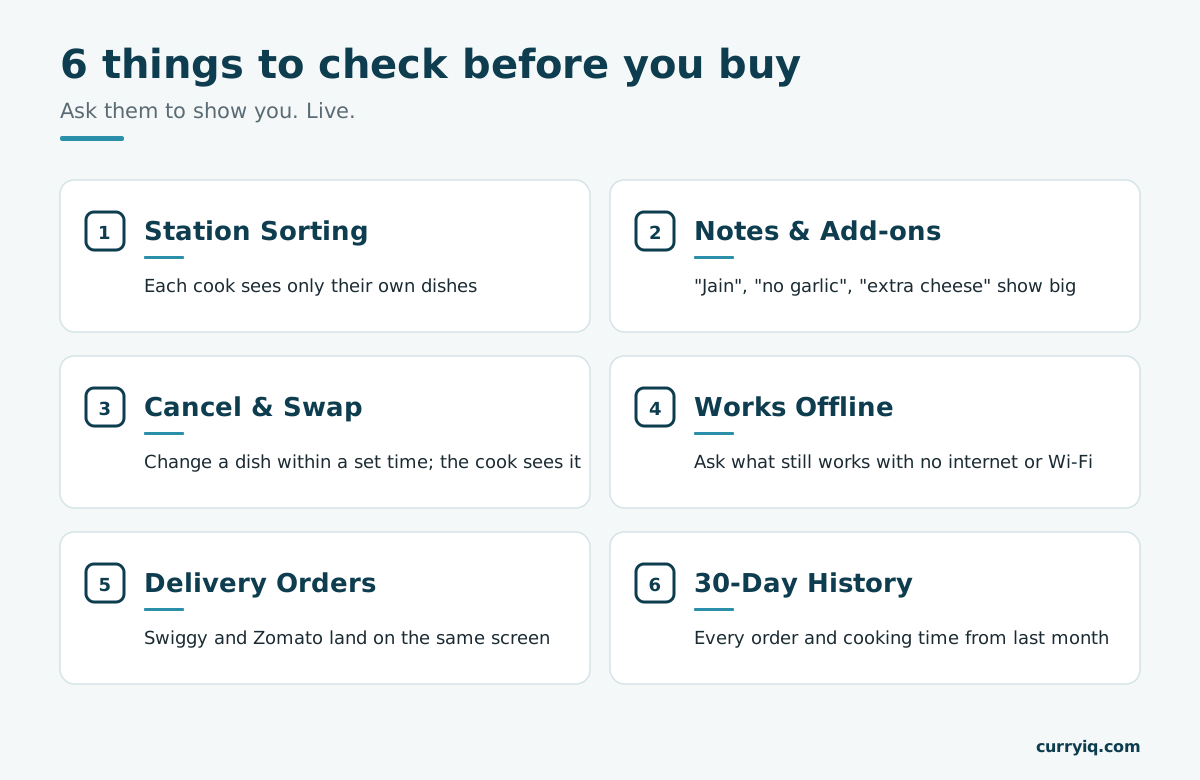
Station sorting, notes, cancel and swap, offline, delivery orders, 30-day history. Check all six live.
1. Station sorting. Punch one order for three cooks. Each should see only their own dishes, with the table still linked.
2. Notes and add-ons. Add "Jain, no garlic, extra cheese." It should show big and clear.
3. Cancel and swap. Change a dish within the allowed time after it's sent. The cook's screen should show the change at once.
4. Works offline. Switch off the internet, then the Wi-Fi. See what still reaches the kitchen each time.
5. Delivery orders. Send a Swiggy or Zomato order. It should land on the same screen, not a separate tablet.
6. 30-day history. Ask to see last month's orders and cooking times. If they can't, the data is gone.
Worried about check 4?
See how CurryIQ keeps billing and the kitchen screen running when your internet goes off in the middle of service.
Moving from paper to screen without the chaos
Start with one station — usually your busiest, the tandoor or the main line. Keep the printer running next to the screen for a week. Let your head cook decide when the paper stops.
Expect two or three clumsy evenings. That's the real cost of switching. Your kitchen doesn't close.
How CurryIQ's KDS works
Short, and easy to check.
- Orders show up the moment they're placed — from the POS, the waiter's tablet or QR ordering — with the table number and time.
- A separate screen for each station: tandoor, grill, cold, desserts.
- Colours show the wait: green, then yellow, then red.
- One tap marks a dish ready, and the waiter is told.
- Keeps working when the internet goes off, on any tablet or TV, in a browser.
- Paper KOT can keep printing alongside for as long as you want.
- Cooking time is saved for every dish and station, without anyone writing it down.
To be honest: if you're one cook at one counter, you don't need this yet. Come back when you add a second station.
What I'd do tomorrow
This Saturday, time ten orders with your phone's stopwatch — from punched to plate leaving the kitchen. Also count every dish forgotten or made twice.
If all ten came out on time and nothing was made twice, your paper KOT is working. Keep it. I mean that.
If three or more ran late, or something got made twice, you know exactly what a KDS would fix — and what to check in the demo.
Ready to try it in your own kitchen?
Put CurryIQ's kitchen screen on one station, keep your printer running, and see what changes in a week. Free setup help, 14 days free, we move your menu over for you, and you can cancel anytime.
— Sagar, founder, CurryIQ
FAQ
What is the full form of KDS in a restaurant?
KDS stands for kitchen display system. It's a screen in the kitchen that shows new orders instead of printing paper KOT slips, with the table number, dishes, special requests and a timer on each order.
What is the difference between KOT and KDS?
A KOT (kitchen order ticket) is the order itself. A KDS is a screen that shows it. A printer puts the KOT on paper; a KDS shows the same KOT on a screen in real time, sends each dish to the right cook, adds a timer, and needs no paper rolls or ink.
How does a kitchen display system work?
An order is placed at the POS, on a waiter's tablet or by QR code. The kitchen screen gets it instantly, the chef taps to accept and again when it's ready, and the waiter's screen shows it's ready to serve.
How much does a kitchen display system cost?
There are three parts: the software (included with some POS systems, extra per screen with others), the screen (an Android tablet or a TV you may already own), and the setup (a wall stand, a UPS for power cuts, and Wi-Fi that reaches the kitchen).
Does a KDS work without internet?
A good one keeps working when the internet goes off, because orders travel inside your restaurant's own network. If the Wi-Fi router or the power goes, the screen can't get orders unless they're on a UPS. Ask the seller to show you each case live.
Do small restaurants need a KDS?
One cook at one counter is usually fine on paper KOT. A KDS starts to pay off once you have two or more stations, orders coming from many places, or dishes that get forgotten or made twice on busy nights.
Can I print KOTs and use a KDS at the same time?
With most good systems, yes. Running both for the first week is the easiest way to switch, with paper as a backup until the kitchen trusts the screen.
Keep reading
Ready to try CurryIQ?
Start free. No credit card required. Setup in 10 minutes.