Billing Software for Restaurants: How to Pick the Right One
The thing coming out of that printer is a legal document. Worth knowing whether yours is a valid one.
Let's start with the boring, useful definition, because most people searching this phrase just want to know what they're buying.
Billing software for restaurants is the software that turns an order into a bill. You punch in the items, it applies GST at the right rate, it prints an invoice with your GSTIN on it, it records how the customer paid. Some of it runs on a laptop, some on a tablet, some on a little Android machine with a printer built in. The good ones do this in under ten seconds and never fumble the tax.
That's the job. It sounds simple, and the software mostly is. What isn't simple is that the piece of paper coming out of your printer is a legal document, and a lot of restaurants are printing one that wouldn't survive being looked at properly.
I build restaurant software, so I see plenty of these. Wrong tax rate on three items and nobody noticed for a year. Invoice numbers that restart from 1 every time the software changed. A whole evening billed by hand because the internet went down and the system wouldn't open. None of it is dramatic. All of it turns into a real problem at exactly the wrong moment.
So here's the honest guide: what billing software does, the eight things your bill legally has to carry, the mistakes that quietly cost money, and how to compare two systems without sitting through two hours of demo.
Fair warning: I build one of these. I've written it so it's useful even if you never touch CurryIQ, and I'll tell you plainly where the cheapest option is the right one. But you should know where I'm standing.
What billing software for restaurants actually does
Strip away the marketing and there are six jobs. Everything worth paying for does these; the differences are in how well.
It takes the order and prices it. Items, quantities, modifiers, whatever combination the guest asks for. On a busy counter this has to be fast — a bill that takes ninety seconds to punch is a queue forming behind it.
It applies GST correctly, per item. Not one rate for the whole bill. Each item mapped to its own rate, calculated automatically, split into CGST and SGST.
It prints a compliant tax invoice. Your GSTIN, an unbroken serial number, the date, itemised lines, tax shown separately. The next section covers all eight elements, because this is where most of the trouble lives.
It sends the order to the kitchen. The KOT — kitchen order ticket — printing at the right station, so the tandoor gets the rotis and the Chinese counter gets the noodles. Some billing software includes this, some charges extra, some doesn't do it at all. If you have a kitchen rather than a counter, it isn't optional.
It records how the customer paid. Cash, card, UPI, split across two, or on account. This is the number you reconcile against at day close, and the one that causes arguments when it isn't captured properly.
It gives you a day close and something your accountant can use. Total sales, tax collected, payment-mode split, and an export that doesn't need reworking every month.
If you run a takeaway counter with a fixed menu, no table service, and you're personally standing at it — software that does these six things well is all you need. I'd rather say that than sell you something heavier than your problem.
Why you need it — three things that go wrong without it
If you're still on a bill book or a plain cash register, this section is the one that matters.
1. The GST problem isn't a risk, it's a certainty. A handwritten bill without your GSTIN, without a serial number, without CGST and SGST shown separately, isn't a compliant tax invoice. One inspection, or one input-credit query from a corporate customer who ate at your place on a company card, and it becomes your problem. Software makes this automatic instead of something you have to remember at 10pm.
2. You can't reconstruct a day you didn't record. A customer disputes a bill from last Thursday. Your accountant needs March's item-wise sales. You want to know whether last Diwali week beat this one. Without a system, none of those questions have answers — and "I think so" is not a basis for a decision about your own money.
3. Speed is revenue on a Saturday. A counter that takes ninety seconds per bill during a rush is a queue, and a queue is people leaving. The least glamorous benefit, and usually the first one owners actually feel.
What a GST-compliant restaurant bill has to carry
This is the part that can cost you money in a way that has nothing to do with your menu prices.
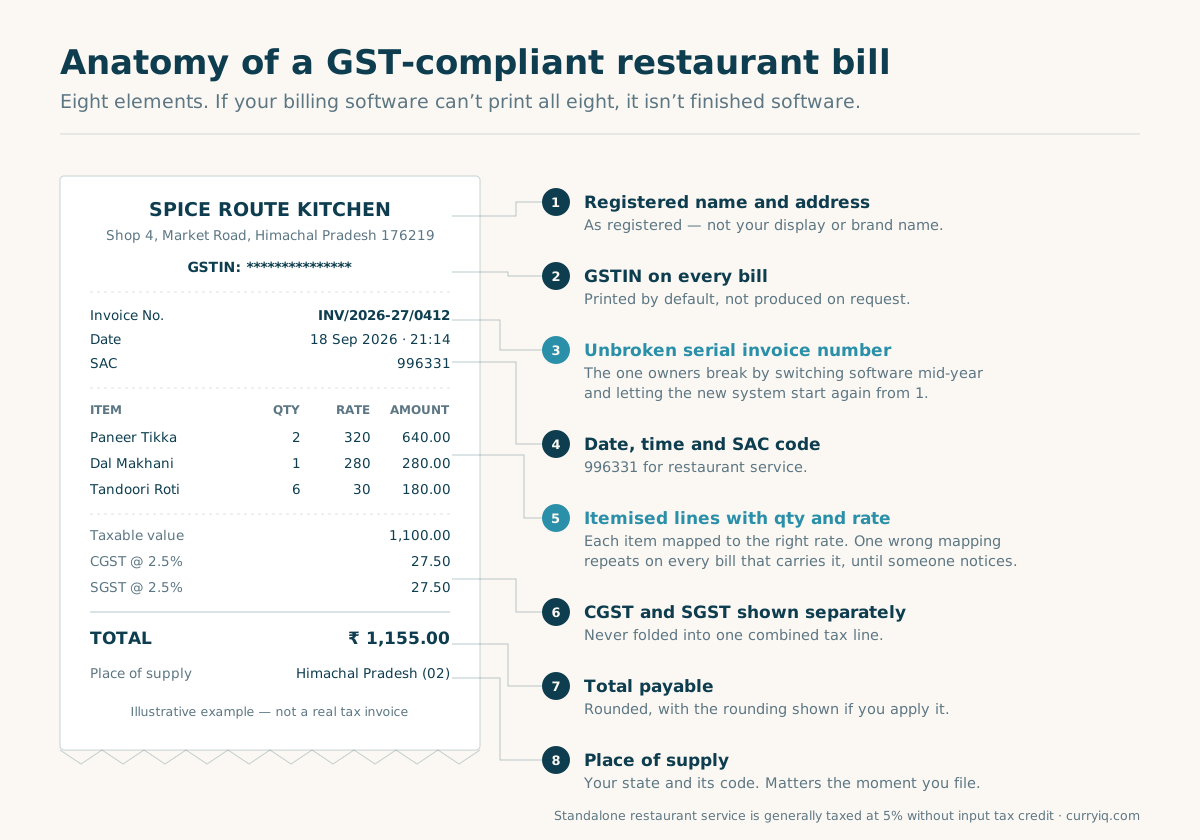
Eight elements. If your software can't print all eight, it isn't finished software.
Standalone restaurant service in India is generally taxed at 5% without input tax credit. The rate is the easy part. The format is where people get caught:
1. Your registered name and address — as registered, not your display name
2. Your GSTIN, printed on every bill rather than produced on request
3. An unbroken serial invoice number
4. The date (and time, which helps you more than it helps anyone else)
5. The SAC code — 996331 for restaurant service
6. Itemised lines with quantity and rate
7. CGST and SGST shown separately, not folded into one tax line
8. The total, and the place of supply
Two of these cause most of the real trouble, and both are worth raising with any vendor before you sign.
The invoice series has to be unbroken. Owners break it without realising, almost always by switching systems mid-year and letting the new software start numbering from 1. If you're changing software, ask specifically how it carries your existing series across. Five-minute conversation, saves an unpleasant one later.
Item-level tax mapping has to be right. Map one item to the wrong rate and you haven't made one mistake — you've made the same mistake on every bill containing that item, every day, until somebody notices. I've seen that run for months.
Confirm your own case with your accountant. Rules move, and I'm a founder, not a CA.
Six billing mistakes that quietly cost money
None of these announces itself. They turn up later as a mismatch nobody can explain, or a question you can't answer.
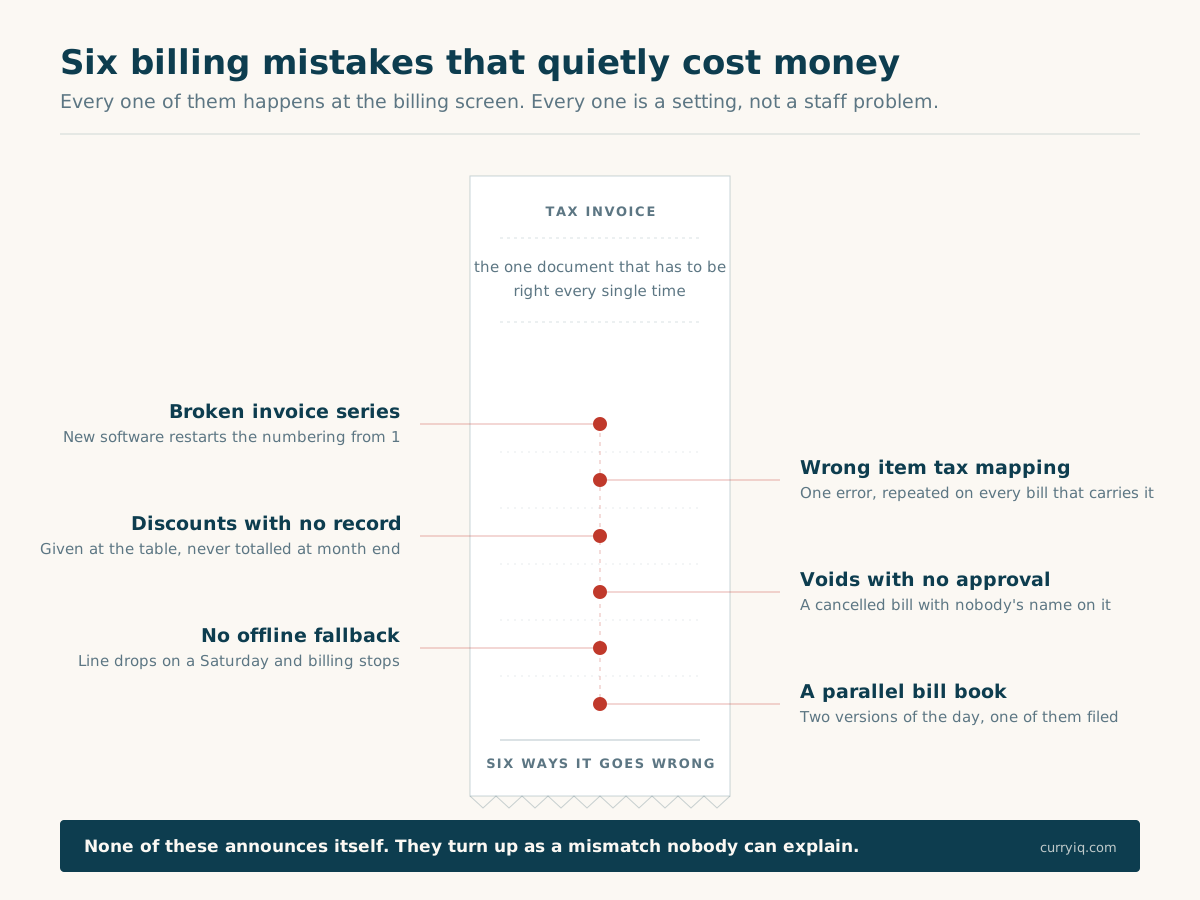
Six things that go wrong at the billing screen. Every one of them is a software setting, not a staff problem.
Broken invoice series. Covered above, and the most common one by a distance. It usually happens on the day you switch software, which is also the day nobody is looking.
Wrong item tax mapping. One item on the wrong rate, repeated across every bill that carries it. Check this at setup, and again any time you add a menu section.
Discounts with no record. A captain knocks ₹200 off a table. Fine — that's hospitality. But if it isn't recorded against a name, you have no idea how much you gave away last month, and neither does anyone else. Most owners guess low.
Voids with no approval trail. A bill cancelled after it was raised, with nobody's name against it, is the easiest way for money to walk out of a restaurant. A manager PIN and a timestamp turns "I think something's off" into a log you can read.
No offline fallback. The connection drops on a Saturday evening and billing stops. Either you turn people away or you write bills by hand — and handwritten bills during a rush is exactly how the invoice series breaks and the day's totals stop matching.
A parallel bill book. Once staff start writing some bills by hand because it's quicker, your software's numbers and your actual sales are two different things, and only one of them is what you'll file on.
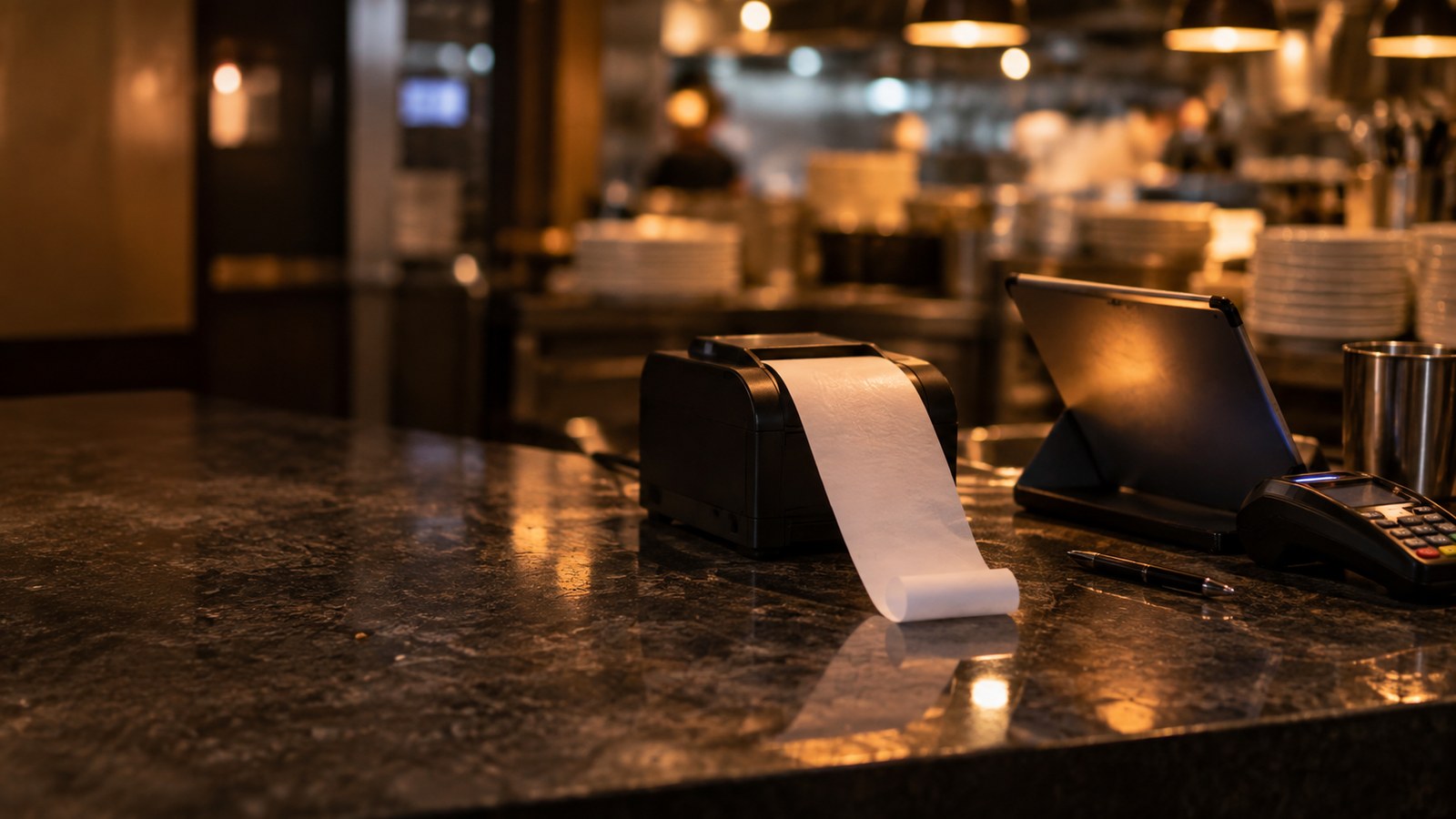
Thermal paper until the software fills it in. Everything that turns it into a tax invoice — the GSTIN, the unbroken serial number, the tax split — is a setting somebody chose once and nobody checked since.
Counter, tables, delivery — what your billing actually needs
"Billing software for restaurants" covers three fairly different setups. Buying for the wrong one is how people end up paying for things they never open, or fighting the software every evening.
A counter or takeaway. One screen, fast item entry, a printer, payment recorded, day close. No table management, and no KOT routing if the kitchen is right there. The cheapest compliant option genuinely is the right answer here — and a system with a big table map you'll never use is worse than a simple one, because it slows the till down.
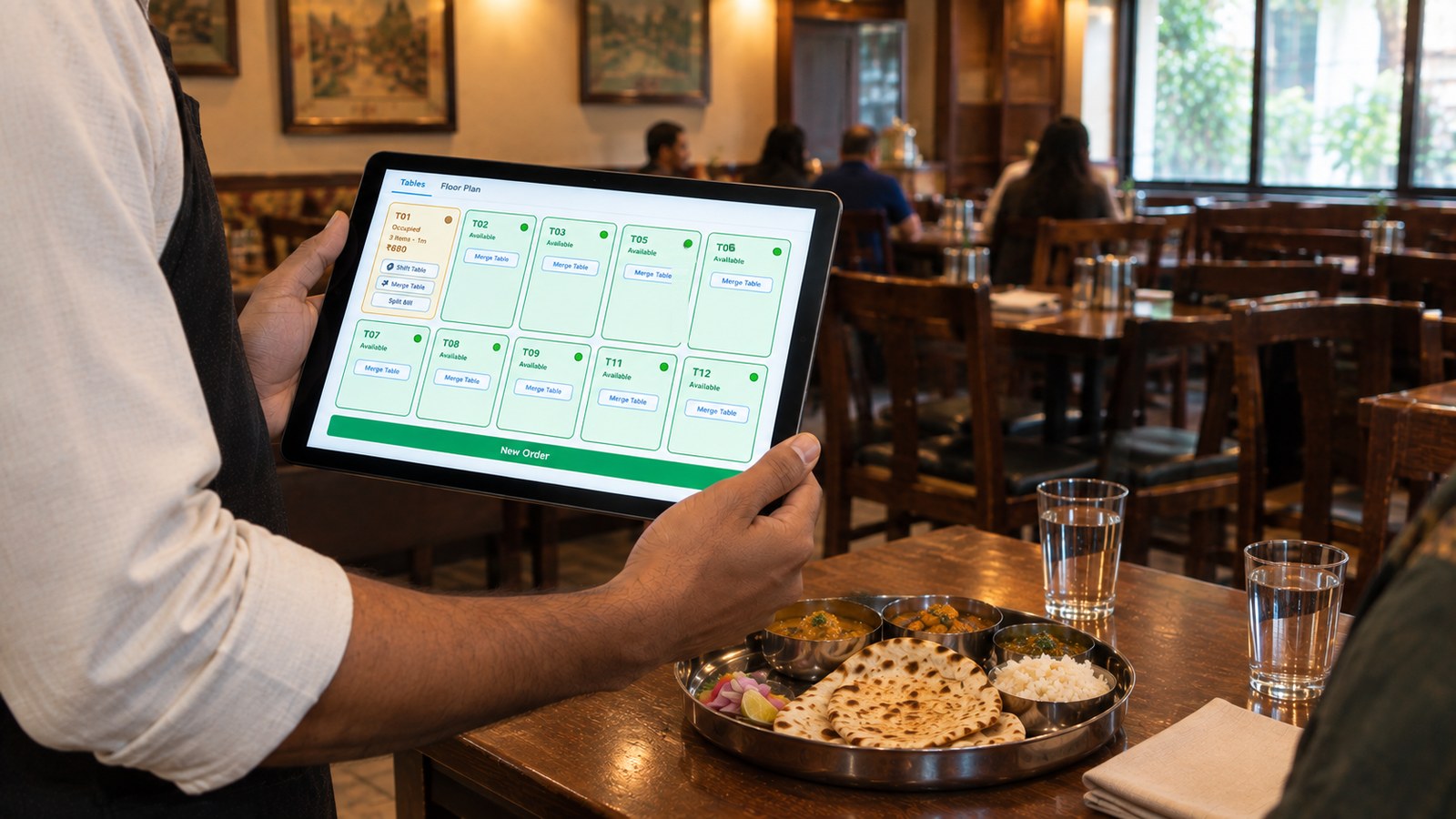
Table service. Now a table has to hold a running order, rounds get added to it, the KOT goes to the right station, and the bill is raised at the end against that table. Merging two tables when a group grows, shifting a party to a bigger table, splitting the bill three ways at the end — all of that is billing, and all of it is a nuisance when the software doesn't do it.
Delivery and takeaway alongside dine-in. The billing itself is simpler, but those orders need to land in the same system as your dine-in bills, under the same invoice series, or your day close becomes two numbers you add up by hand.
Work out which one you are before you look at a single pricing page. It narrows the field faster than any feature comparison.
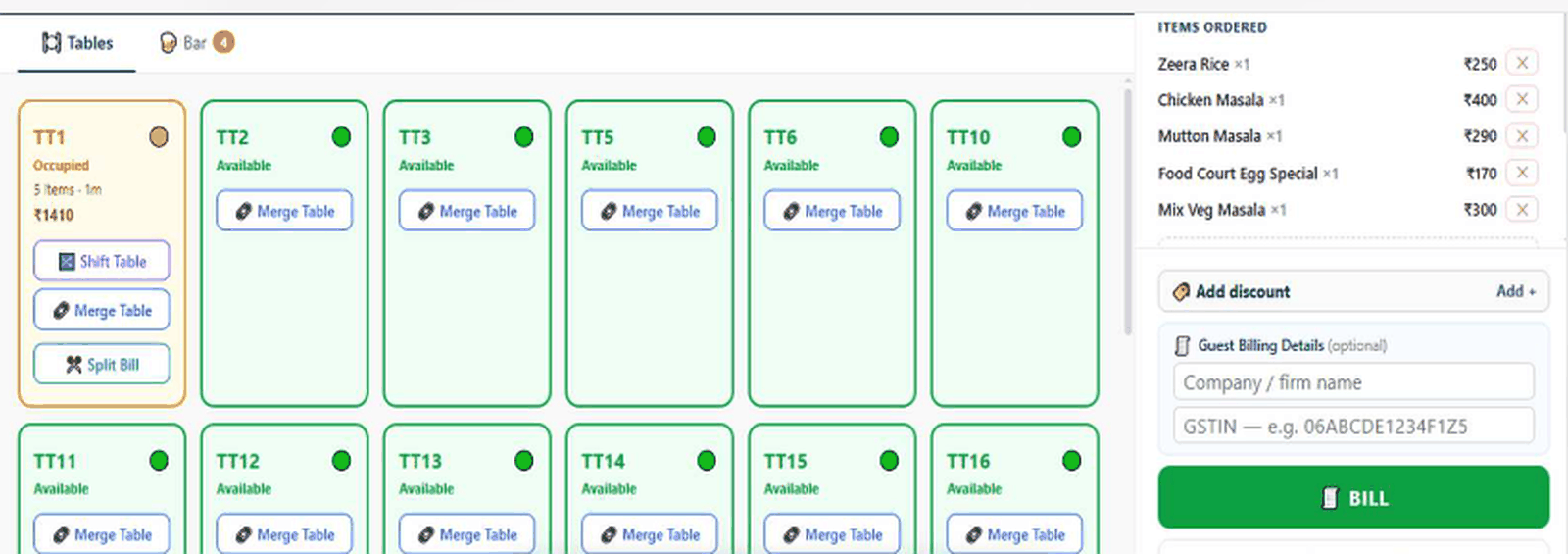
Table-service billing: one table holding a running order, with merge, shift and split-bill on the table card itself and GSTIN capture beside the bill button.
If you want to see how this works on a real counter, the CurryIQ billing software for restaurants runs on the tablet you already own — table map, KOT and GST-correct bills from the same screen.
Six signs your billing setup has stopped keeping up
Not theory. These are the ones owners actually describe to me, and every one of them happens at the billing screen.
1. Staff raise bills when you're not there. The moment billing leaves your hands, you need a record of whose hands it's in — which bill, which discount, whose login.
2. Discounts get given at the table and nobody totals them. You're running a promotion you never approved and can't size.
3. Bills get handwritten when the line drops. Every one of those is a gap in your series and a number that won't match at day close.
4. You're reconciling at night. Sitting with a calculator after service because cash in hand doesn't match what the system says isn't a discipline problem. It's a tooling problem — usually payment modes that weren't captured properly at billing.
5. Tables and split bills are handled on paper. The software bills fine for a counter and gives up the moment a group of eight wants three separate bills.
6. You have a second outlet, or you're about to. Two billing systems means two invoice series, two day closes and two sets of tax records to reconcile by hand.
One of these and you're probably fine. Three or more and the billing software is costing you time and money every week — you just never get an invoice for it.
Where billing software's job ends
Worth being clear about this, because "billing software" and "POS" get sold as the same purchase and they aren't quite.
Billing software owns the invoice. The order gets priced, the tax applied, the bill printed, the payment recorded, the transaction closed. A full POS carries that same order further — into stock, approvals, reporting — but the billing is one step inside it rather than the whole product.
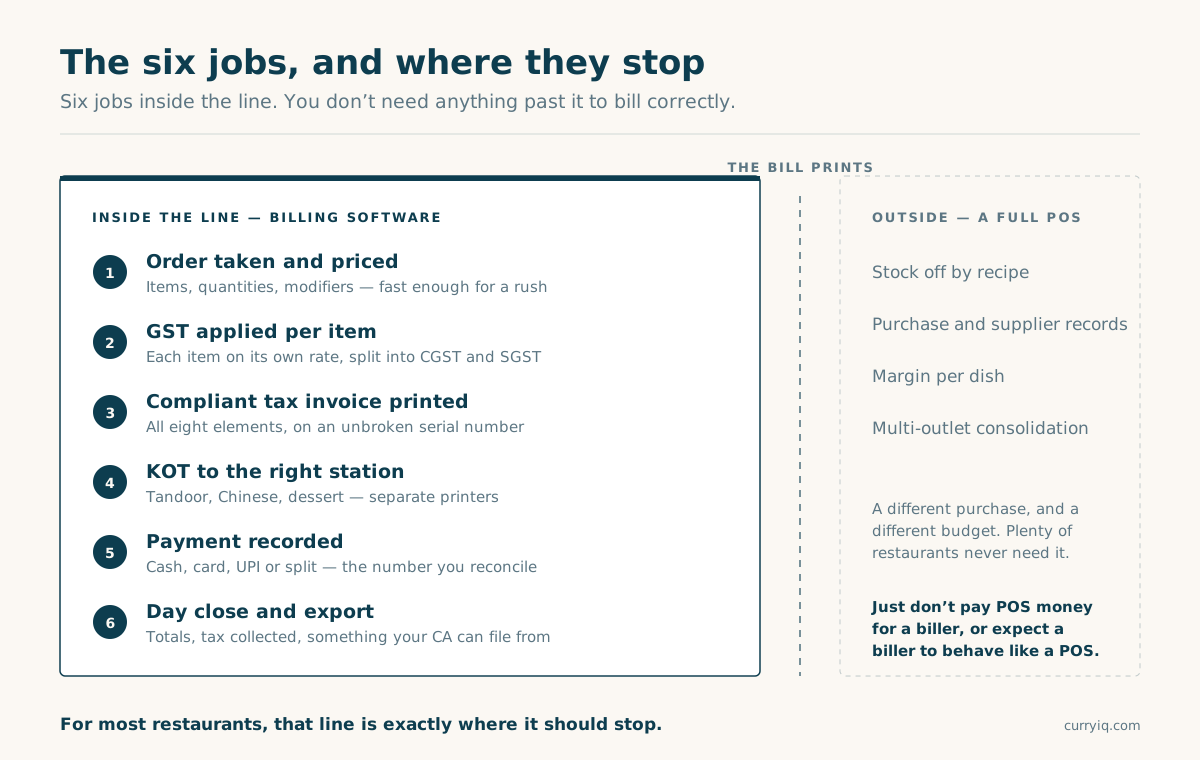
Six jobs inside the line. Everything past it is a different purchase, and you don't need it to bill correctly.
The practical version: ask what your software knows after the bill prints.
If the answer is "nothing, that's the end of it" — you have billing software, whatever the vendor calls it on their website. That's not an insult. For most restaurants most of the time, the end of it is exactly where it should end. You just want to know which one you're buying, so you don't pay POS money for a biller or expect a biller to behave like a POS.
If you read that and thought I think I need the bigger thing, the next guide is the one you want: POS software for restaurants covers how a POS works step by step, what one costs in India, and how to test any demo in fifteen minutes.
How to compare two systems in ten minutes
Take these into every demo, including ours.
1. Print me a real bill, right now. Then check it against the eight elements above, one by one, while they watch. Two minutes, and it tells you more than the rest of the demo.
2. Pull the internet out and keep billing. Watch it happen rather than hearing that it does. Then plug it back in and check the offline bills synced without duplicating.
3. Can a waiter void a bill or give a discount without a manager? If yes, your control layer is missing and no report will fix it.
4. If I leave in a year, what comes with me? Menu, bills, tax records, customer data — and in what format. The answer tells you exactly how confident they are.
Two more if you have tables: how does it merge two tables and split one bill, and which printer does a KOT go to. Both get a five-second answer from someone whose software does it, and a lot of hedging from someone whose doesn't.
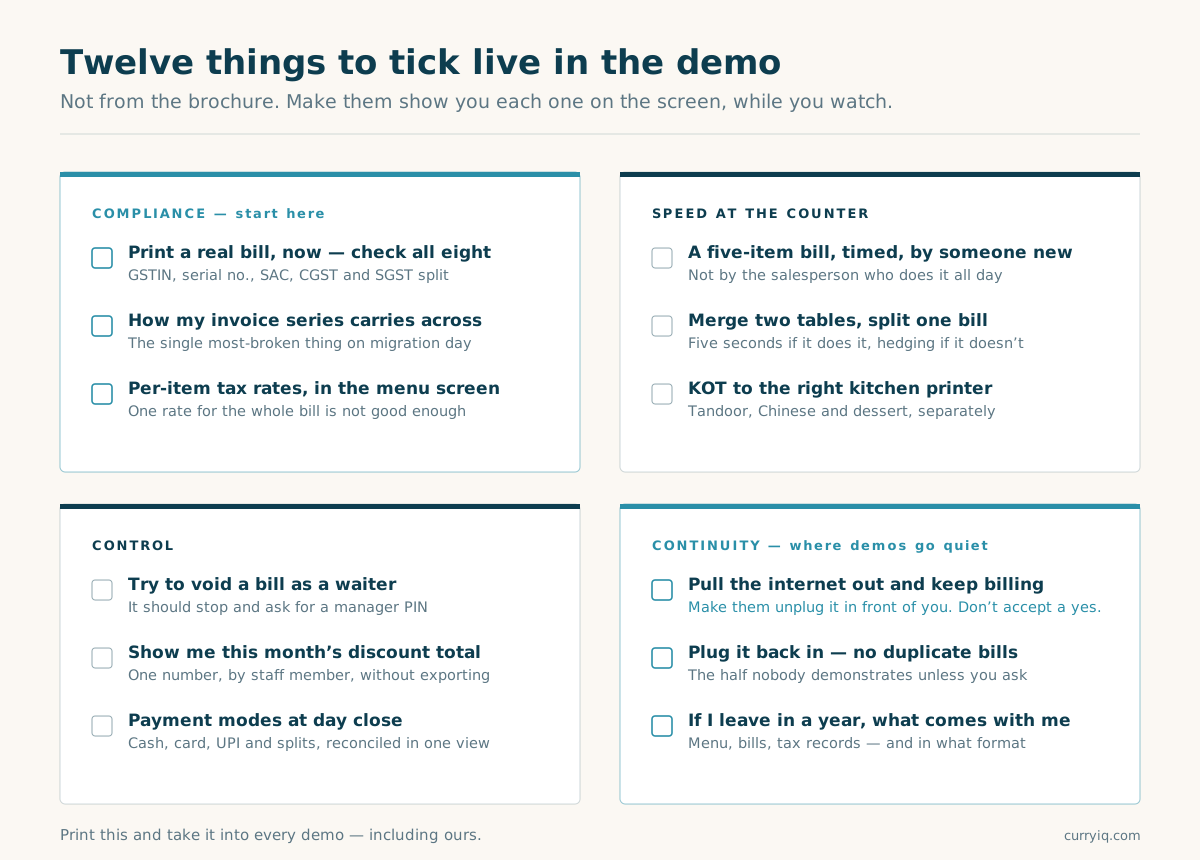
Tick these live on the screen. Not from the brochure.
What switching really costs you
The honest answer, because the dishonest one is "nothing, it's effortless" and you'd be right not to believe it.
The technical part is smaller than people fear: menu import, tax mapping per item, staff accounts, and your invoice series carried across so the numbering doesn't break. Days, not weeks, and it happens outside service hours. A trial period exists precisely so you can run the new thing alongside the old one before committing.
Every billing software for restaurants vendor will tell you migration is painless. The real cost is human and it lands in the first week. Your captains have muscle memory for the old screen and they will be slower on the new one. Somebody will grumble. One evening will feel clumsy. That's the actual price, and anyone telling you otherwise hasn't done it.
What it isn't is a closed restaurant. That fear is the single most common reason owners stay on billing software they outgrew two years ago.
How CurryIQ handles billing
Short and checkable, since this is the part where I'm selling.
GST-correct invoices, per item. All eight elements, CGST and SGST split, SAC on the bill — and your existing invoice series carried across on migration, so the numbering doesn't break on day one.
Table-service billing that behaves. A table holds a running order, rounds get added to it, and merge, shift and split-bill sit on the table card itself rather than three menus deep. That's the screenshot above, not a mockup.
KOT to the right station. Tandoor, Chinese, dessert, on separate printers, raised the moment the item is punched.
Billing that survives the line going down. Offline mode keeps the till working and syncs when the connection returns. Ask every vendor for a live demo of this with the cable pulled — including us.
Discounts and voids behind a manager PIN, every one recorded with a name and a timestamp, so the second and fourth mistakes above stop being invisible.
Day close and an accountant-ready export, so month-end doesn't involve rebuilding anything by hand.
Runs on what you already have. CurryIQ opens in the browser, so there's nothing to install and nothing to update on twelve devices. The tablet at the counter, the laptop in the back office and your phone all use the same login. Set up an account and bill from the first evening.
The honest boundary: if you're a single takeaway counter with eleven items on the menu and you're standing at it yourself, the cheapest compliant biller in the market will do this job and you should buy that instead. Come back when you hire your second person or put in your first table.
Full capability list is on the features page, and the tiers are on pricing.
What I'd do tomorrow morning
Not next quarter. Tomorrow, before service. It takes ten minutes.
Pull your last twenty bills and check them against the eight elements.
GSTIN on every one. Serial numbers unbroken, with no restart in the middle. CGST and SGST split out rather than folded together. SAC code present. Place of supply there.
Then open your menu in your software and spot-check the tax rate on five items — one from each section, including whatever you added most recently.
If it all checks out, your billing software for restaurants is doing its job and you don't need to change anything. Genuinely — don't switch for the sake of switching.
If something doesn't, you've found it on a quiet morning instead of on the day someone official asks. That's the whole point of doing it tomorrow rather than eventually.
If you want billing that gets this right by default
GST-correct invoices, KOT to the right station, table and counter billing, offline when the line drops, and a day close your accountant can work from. Free onboarding, a 14-day trial, migration from whatever you're on now with your invoice series intact, cancel anytime.
→ See it at curryiq.com · Start a free trial
Opens in the browser on any tablet, phone or laptop — nothing to install.
Set up your menu, print a bill with your own items on it, and check it against the eight elements above. That's the whole test.
— Sagar, founder, CurryIQ
Frequently asked
What is billing software for restaurants?
Software that turns an order into a tax-correct invoice — items priced, GST applied per item, a compliant bill printed, the payment recorded, and a day close at the end of service. Most also send the KOT to the kitchen.
What must a GST-compliant restaurant bill contain?
Registered name and address, GSTIN, an unbroken serial invoice number, date, SAC code (996331 for restaurant service), itemised lines with quantity and rate, CGST and SGST shown separately, the total, and place of supply. Confirm your specific case with your accountant.
What GST rate applies to restaurant bills in India?
Standalone restaurant service is generally taxed at 5% without input tax credit, shown on the bill as 2.5% CGST and 2.5% SGST. Your accountant can confirm whether anything about your setup changes that.
Is free billing software enough for a small restaurant?
For a takeaway counter with a fixed menu and the owner standing at it, often yes — as long as it prints all eight required elements and keeps the invoice series unbroken. It stops being enough once you have tables to track, staff giving discounts, or a connection you can't rely on.
Does restaurant billing software work without internet?
Some does, some doesn't, and vendors are vague about it. Ask for a live demonstration with the connection pulled, then check that the offline bills sync without duplicating when it comes back.
What's the difference between billing software and a restaurant POS?
Billing software's job ends when the bill prints and the payment is recorded. A POS carries the same order further, into stock, approvals and reporting. Billing is one step inside a POS rather than the whole product — this guide covers the POS side in full.
How long does it take to switch restaurant billing software?
The technical migration is usually a few days and happens outside service hours. Staff getting genuinely comfortable with a new screen takes a week or two. Ask specifically how your existing invoice series is carried across.
Which billing software is best for a small restaurant in India?
It depends on your setup. For a counter operation, the cheapest compliant biller is a sound choice. Once you have tables, staff taking orders and a connection that drops, look for table and split-bill handling, offline billing and a manager PIN on discounts and voids before you compare prices.
Keep reading
Ready to try CurryIQ?
Start free. No credit card required. Setup in 10 minutes.