POS Software for Restaurants: What You're Actually Buying
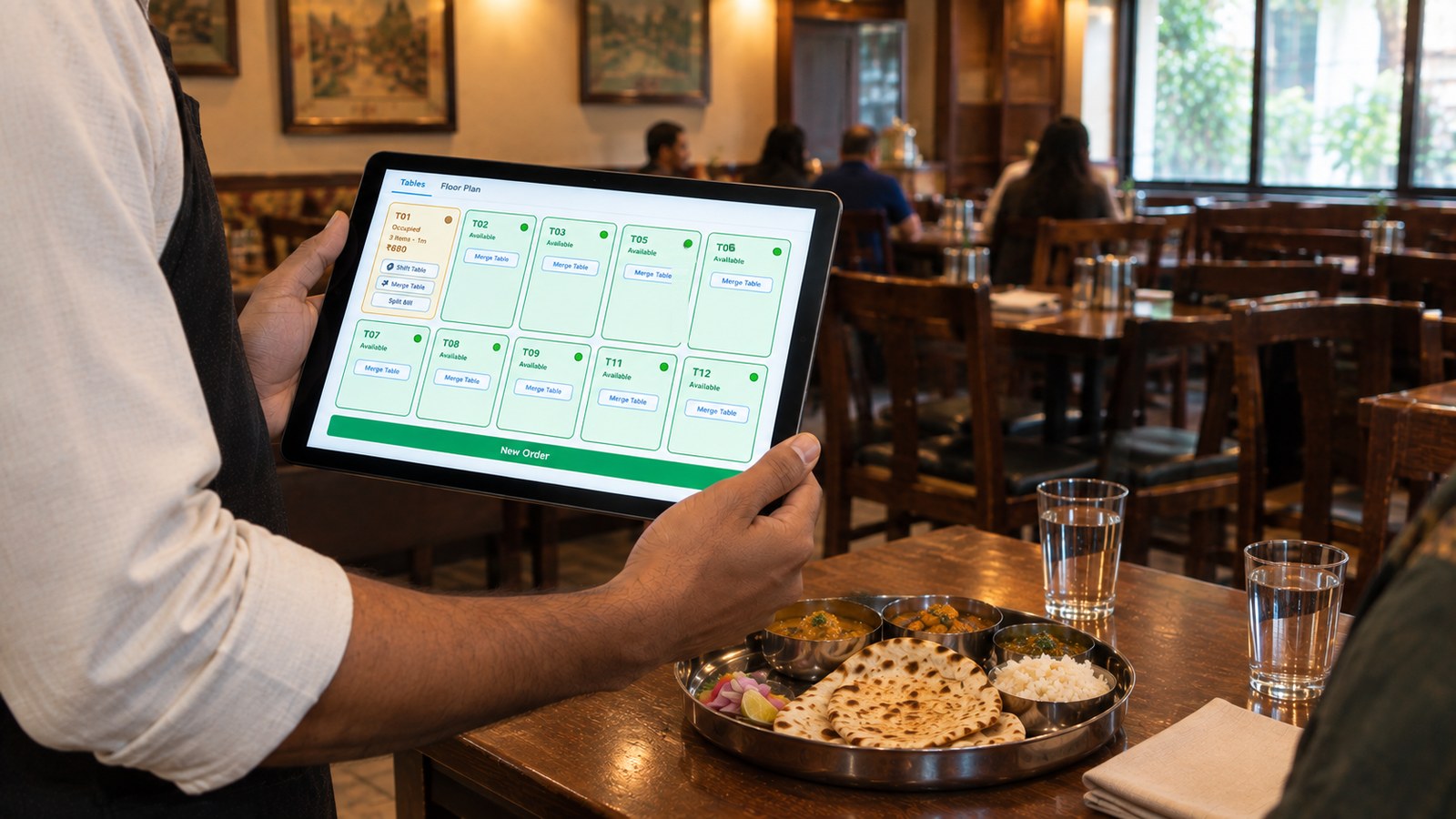
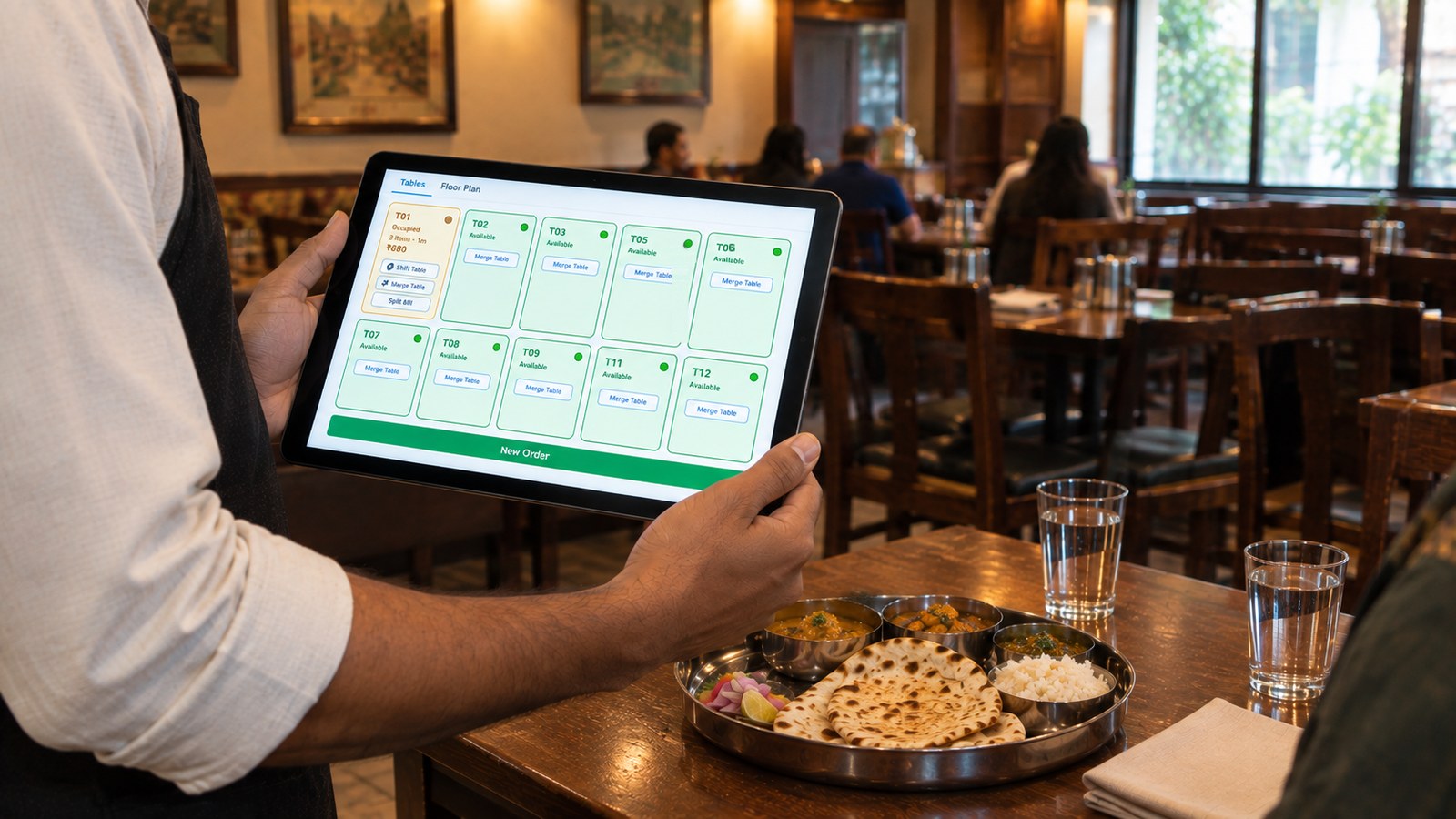
The order goes into the system at the table, not onto a pad. T01 is running at ₹680 and the kitchen already knows.
A POS demo takes forty minutes and every one of them looks the same. Someone taps a table on a pretty floor map, adds a paneer tikka, splits the bill three ways, and prints a receipt in nine seconds. You nod. It looks fine.
Here's what no demo shows you: the Saturday at 8:40pm when the internet drops and the tablet goes white. The order somebody voided after the food had left the kitchen, with nobody's name against it. The month-end where the app says ₹4.2 lakh and the cash drawer says something else, and you spend Sunday morning with a calculator trying to find the gap.
Point of sale software for restaurants — POS software — is the system that takes an order, sends it to the kitchen, prints a compliant bill, records the payment, and keeps a record of all of it you can actually use. That's the definition. The gap between vendors isn't what they do; it's what they do on a bad night.
I build one of these, so treat everything below accordingly. I've written it so it's useful even if you never touch CurryIQ, and I'll tell you plainly where a cheaper option is the right call.
The short version
- A restaurant POS system covers ordering, kitchen routing, billing, payments and reporting. Billing software covers only the bill.
- In India, a restaurant POS system costs roughly ₹500–₹3,000 per outlet per month, plus hardware. What moves that number is outlets, terminals and whether inventory is included — not the number of features on the brochure.
- Free POS software is genuinely enough for a single counter. It stops being enough the moment staff take orders unsupervised.
- The four things worth testing in any demo: print a real bill, pull the internet out, try to void as a waiter, and ask what data you take with you if you leave.
What is a restaurant POS system?
A restaurant POS system is the software and hardware that captures an order, prices it, sends it to the kitchen, produces a GST-compliant bill, records how the guest paid, and stores that data for reporting. (What that bill legally has to carry is a subject of its own.) Point of sale, literally — the point where the order becomes money.
That's the textbook answer. The working answer is different: your POS is the only thing in the building that knows what happened. The kitchen knows what it cooked. The captain knows what the table asked for. The cash drawer knows what came in. Only the POS knows all three at once, which is why a gap between them is always a POS question first.
A complete restaurant management software setup usually has five parts:
| Part | What it does | Who touches it |
|---|---|---|
| Order capture | Table map, counter screen, waiter tablet or QR menu | Captains, cashier, guests |
| Kitchen routing | KOT printed or displayed at the right station | Kitchen |
| Billing | GST invoice, discounts, splits, payment modes | Cashier, manager |
| Control | Logins, manager PIN, audit trail on voids and discounts | Owner, manager |
| Reporting | Day close, item sales, payment reconciliation | Owner, accountant |
Vendors bundle these differently, and that's most of what you're comparing. A "POS" that only does the middle two is a biller wearing a bigger name.
How does a restaurant POS system work?
Follow one plate of paneer tikka from the table to the day close, and the whole thing makes sense.
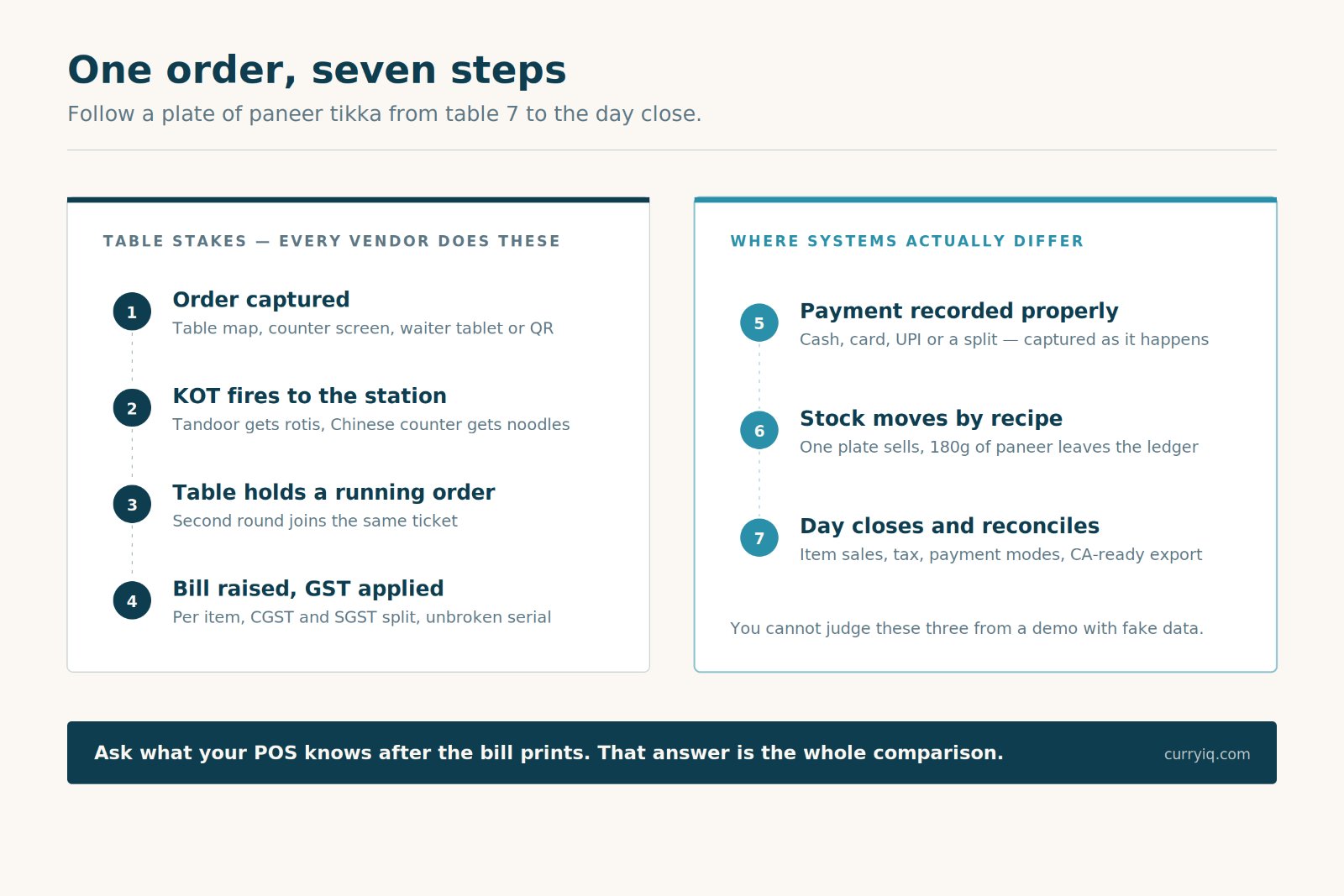
One order, seven steps. Most systems handle the first four well. The last three are where they separate.
1. The order is captured. A captain taps table 7 on a tablet, or the guest scans a QR code, or the cashier punches it at the counter. It lands in one place regardless of where it came from.
2. The KOT fires. The tandoor station prints the rotis, the Chinese counter gets the noodles. Nobody walks a paper chit across the kitchen and nobody shouts.
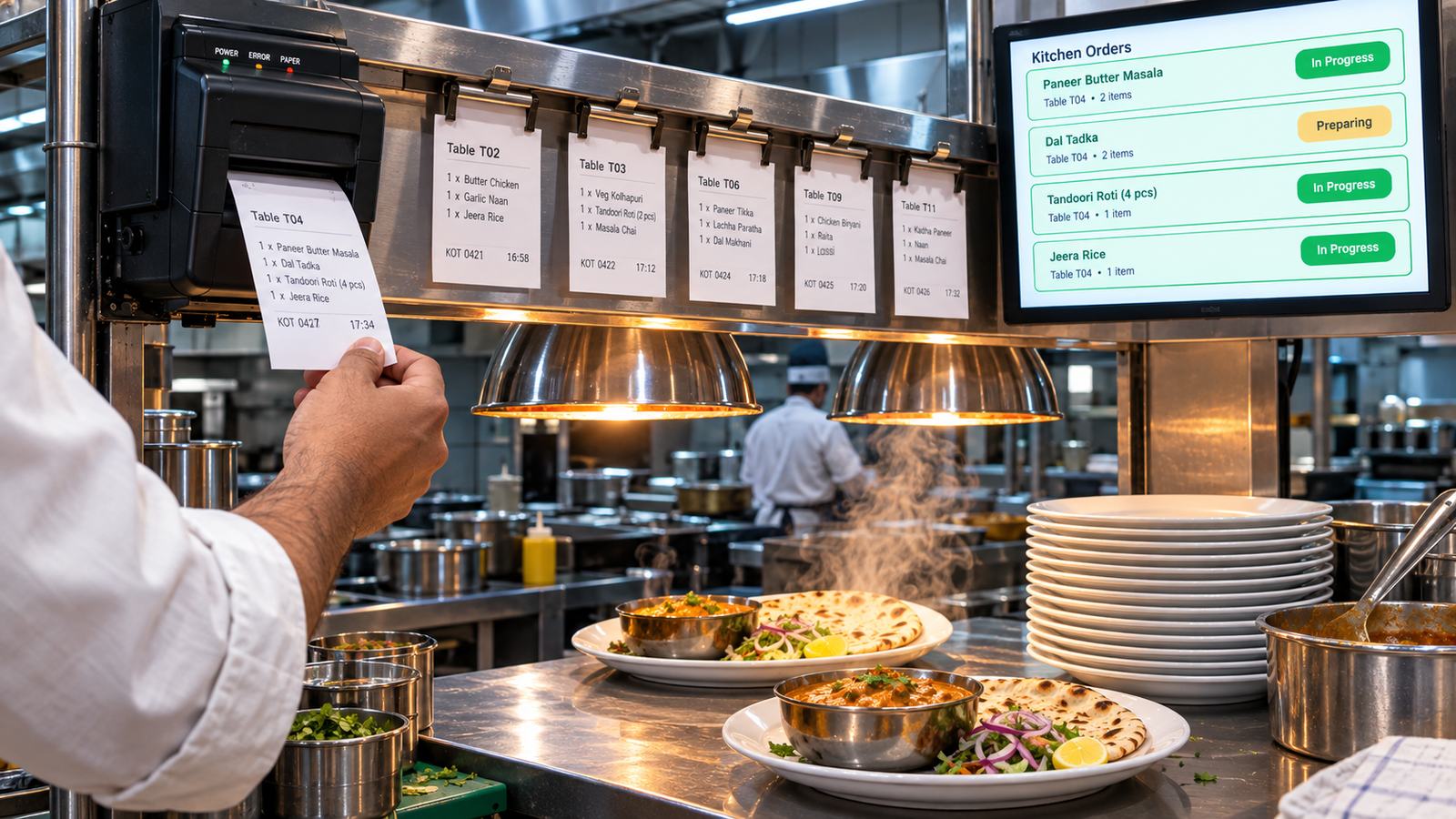
Step two, at the pass. The ticket prints at the station that cooks it, and the screen above keeps the order together so nothing goes out cold waiting for the rest of the table.
3. The table holds a running order. Second round of drinks goes onto the same table, not a new ticket.
4. The bill is raised. GST applied per item, CGST and SGST split, your GSTIN and an unbroken invoice number on it. If the group wants three separate bills, the system splits them.
5. Payment is recorded. Cash, card, UPI, or a split across two of them, captured as it happens rather than guessed at 11pm.
6. Stock moves. A proper POS deducts ingredients by recipe, so selling that plate takes 180g of paneer out of your ledger without anyone counting.
7. The day closes. Total sales, tax collected, payment-mode breakdown, item-wise report, and an export your accountant can file from.
Steps 1 to 4 are table stakes — every vendor does them, and does them fine. Steps 5, 6 and 7 are where systems quietly differ, because they're the ones you can't evaluate in a forty-minute demo with fake data.
Billing software vs POS software for restaurants
This is the single most common confusion in the category, and it costs people money in both directions — some overbuy, some underbuy.
Billing software's job ends when the bill prints. Order in, tax applied, invoice out, payment noted, transaction closed. Nothing happens downstream.
A restaurant POS system carries the same order further — into the kitchen before the bill, and into stock, approvals and reporting after it.
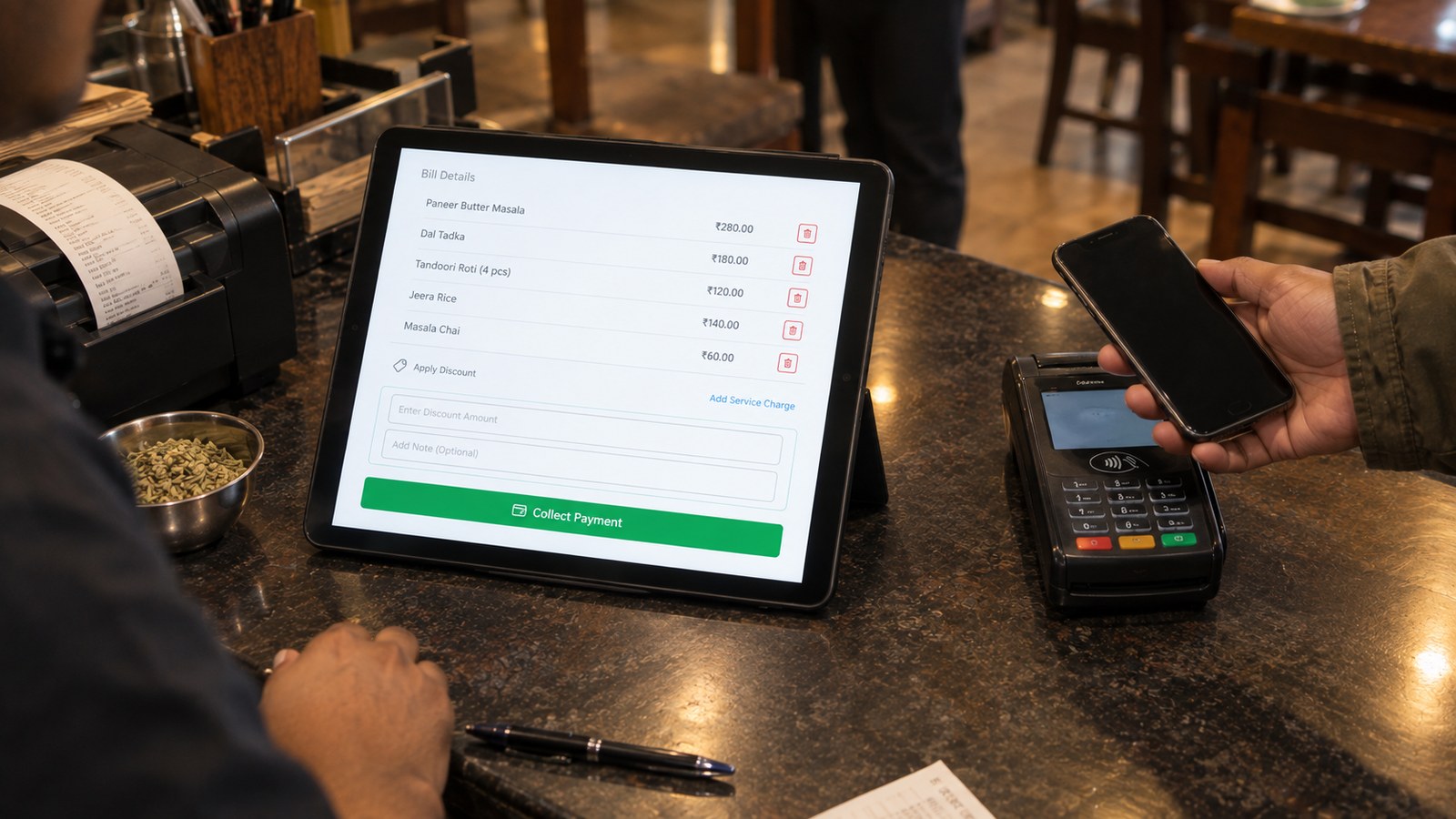
The same screen does both jobs. Items, discount, service charge and the payment button in one place, so the person on the counter isn't switching apps at the busiest minute of the night.
Neither is better. They're different purchases at different prices for different restaurants. If you're a takeaway counter with eleven items and you're standing at it yourself, billing software is the correct answer and a POS is money you don't need to spend. I wrote a whole guide on that side of it: billing software for restaurants, including the eight elements your GST bill legally has to carry and the six billing mistakes that quietly cost money. If compliance is your immediate worry rather than operations, start there and come back.
The test that settles which one you need: ask what your software knows after the bill prints. If the honest answer is "nothing, that's the end of it", you have billing software. That's fine — until you have staff.
Types of restaurant POS systems: cloud, on-premise and hybrid
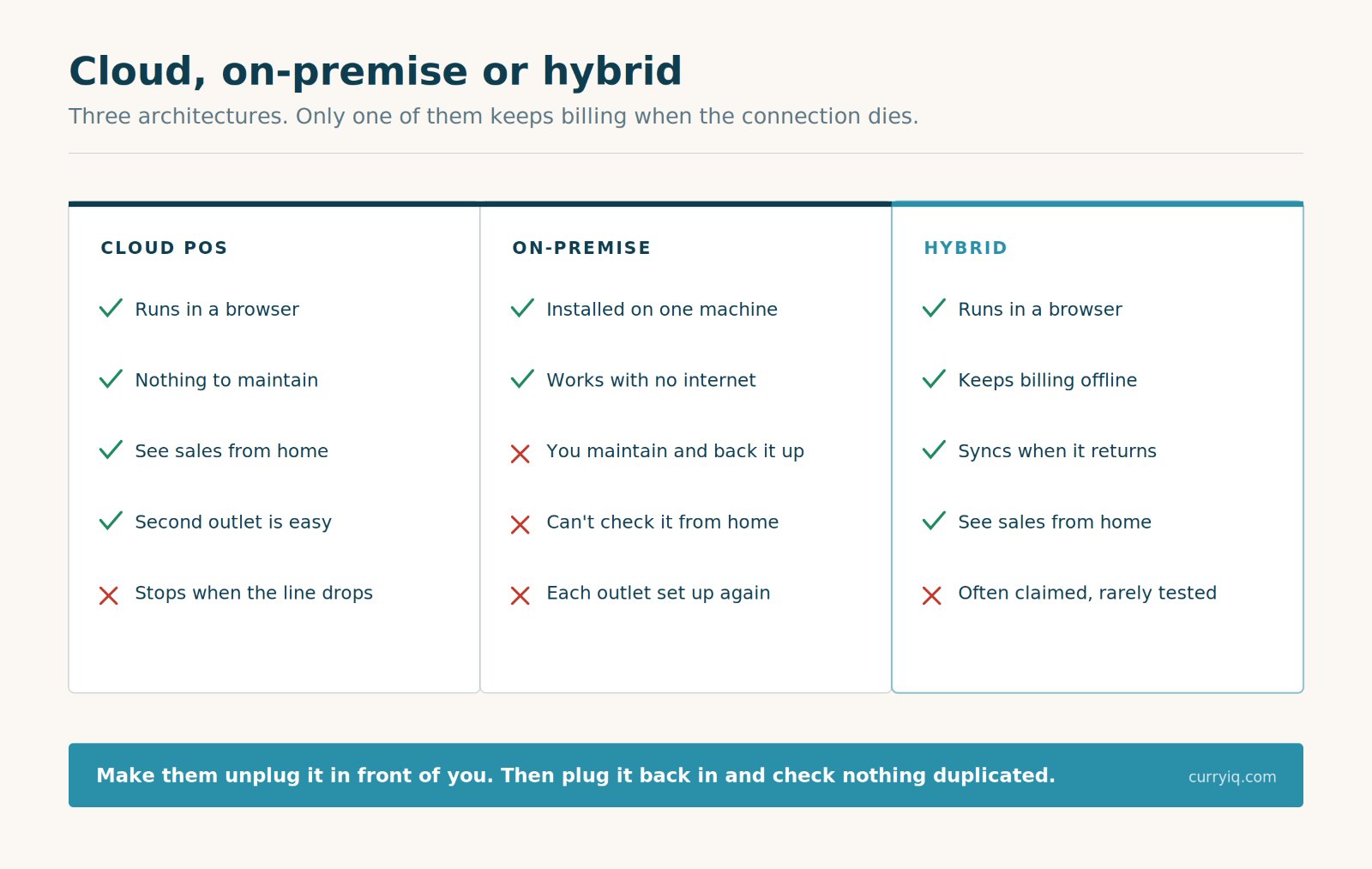
Three architectures. The hybrid column is the one to want in India, and the one most vendors are vaguest about.
You will also see this category sold as restaurant management software, which usually means a POS plus inventory and reporting bundled together. Same thing, wider label.
Cloud POS. Runs in a browser, data lives on the vendor's servers, you reach it from anywhere. Cheap to start, nothing to maintain, updates arrive on their own. The catch is obvious and it's the one that matters in a hill town: no internet, no billing.
On-premise POS. Software installed on a machine in your restaurant, data on that machine. Works with no internet at all. The catch is everything else — you maintain it, you back it up, you can't see yesterday's sales from home, and adding a second outlet means doing the whole thing again.
Hybrid. Runs in the cloud but keeps working when the connection drops, then syncs when it returns. This is what most restaurants actually need and what most vendors describe more confidently than they deliver.
There's no prize for guessing which one a vendor will claim. There is a way to check, and it takes thirty seconds: make them unplug it in front of you, keep billing, then plug it back in and confirm nothing duplicated. A vendor whose offline mode is real will do this happily. One whose isn't will explain why you don't need to.
Quick service vs table service: which POS fits your floor
A quick service restaurant POS system and a table-service one are genuinely different products, and buying the wrong shape is how owners end up fighting their software every evening.
| Quick service / counter | Table service | Delivery-led | |
|---|---|---|---|
| Speed priority | Bill in under 10 seconds | Order accuracy over speed | Order intake from multiple channels |
| Must have | Fast item grid, one-tap payment | Table map, running orders, split bill, merge tables | All orders in one screen, one invoice series |
| KOT | Optional if the kitchen is at the counter | Essential, routed per station | Essential, with packing checks |
| Don't pay for | Table management you'll never open | A counter-only screen that can't hold a table | Table maps |
Work out which column you're in before you look at a single pricing page. It eliminates half the market immediately, which is worth more than any feature comparison.
The real benefits of a restaurant POS system
Not the brochure list. The four things owners actually report back after three months.
You stop reconstructing the day from memory. Item-wise sales, payment modes, the hour your covers peak. Not opinions — records.
Discounts and voids get a name on them. The single biggest quiet leak in a restaurant isn't theft, it's generosity nobody totals. A POS with a manager PIN turns "I think we discount a fair bit" into a number.
The kitchen stops depending on shouting. KOTs routed per station cut the wrong-dish rate more than any training session I've seen.
Month-end takes an hour instead of a Sunday. Because the export already matches what the drawer says.
None of that comes from the POS itself — it comes from the restaurant management software finally recording things in one place instead of four.
Notice what's missing from that list: nothing about the POS making you more money by itself. It won't. It makes the decisions you were already making visible enough to be right more often.
Restaurant POS system price in India: what drives the cost
Nobody publishes a straight answer, so here's the honest shape of the market as of 2026.
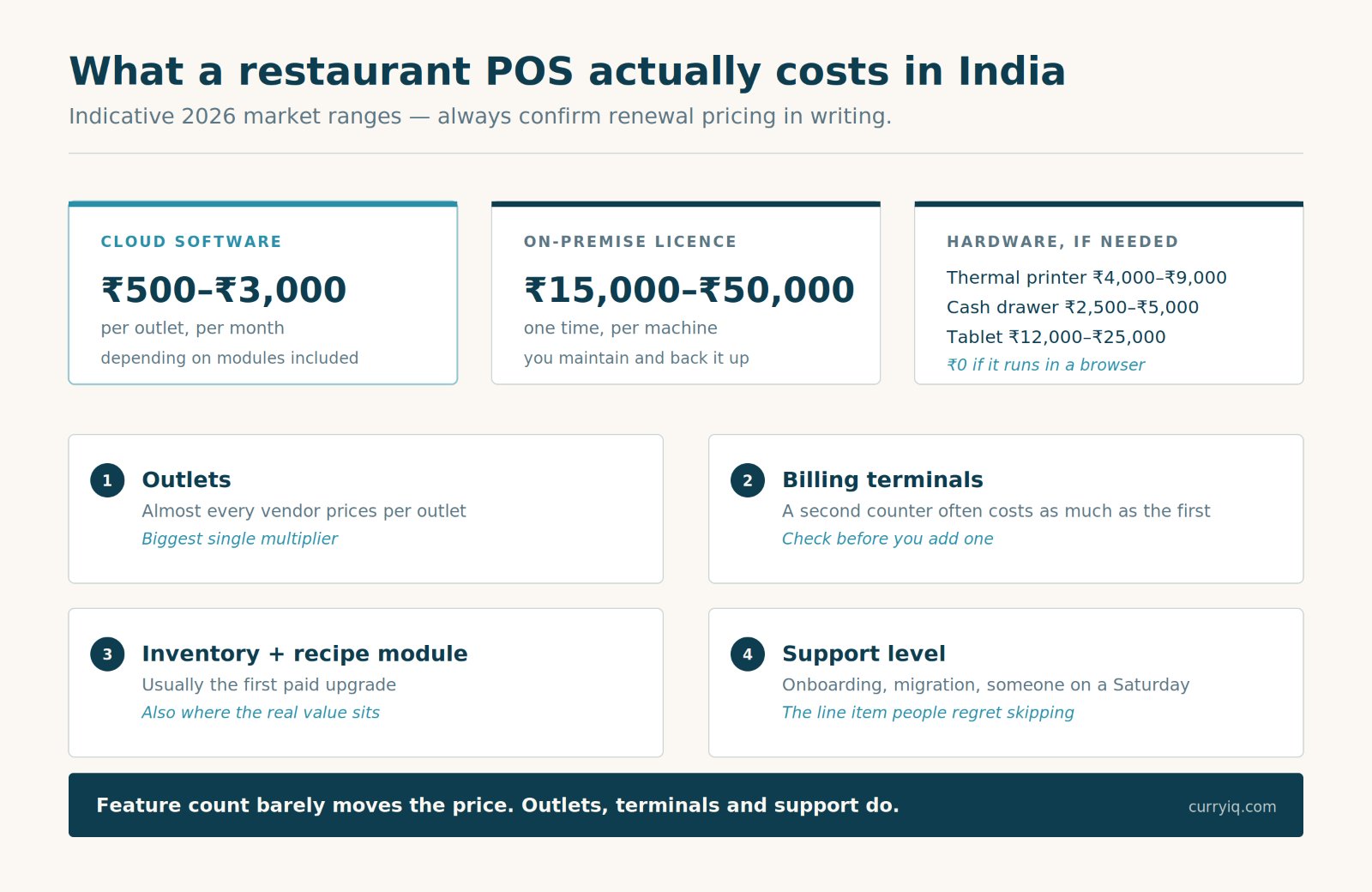
Four things move the number. Feature count is not one of them.
Software: roughly ₹500 to ₹3,000 per outlet per month for cloud POS in India, depending on modules. Many vendors also sell one-time licences in the ₹15,000–₹50,000 range for on-premise setups.
Hardware, if you need it: a thermal printer ₹4,000–₹9,000, a cash drawer ₹2,500–₹5,000, a tablet ₹12,000–₹25,000, a card machine usually supplied by your payment provider. A browser-based POS on a tablet you already own costs nothing extra here, which is the cheapest path into a proper system.
What actually moves your bill:
1. Number of outlets — almost every vendor prices per outlet
2. Number of billing terminals — a second counter often costs as much as the first
3. Inventory and recipe modules — usually the first paid upgrade, and usually where the real value sits
4. Support level — onboarding, migration and whether someone picks up the phone on a Saturday
What doesn't move it as much as you'd expect: feature count. Most POS systems have 80% of the same features. You're paying for the 20% you'll use and the support you'll need.
One warning worth more than the rest: ask what happens to your price at renewal. An introductory rate that doubles in year two is common enough that you should ask directly and get the answer in writing.
Is free restaurant POS software enough?
Sometimes, genuinely. Here's the honest line.
Free works when: one counter, fixed menu, you're personally standing at it, and the software prints a GST-compliant bill with an unbroken invoice number. That's a real business running properly. Don't let anyone tell you otherwise.
Free stops working when any of these becomes true:
- Staff raise bills when you're not in the room
- Discounts get given at the table and nobody totals them at month end
- You have a kitchen that needs KOTs routed to more than one station
- You count stock manually and have stopped trusting the number
- You've opened a second outlet, or you're about to
- Your connection drops during service and billing stops
Three or more of those and free software is costing you more than a paid one would — you just never get an invoice for the difference.
The other thing to check on any free tier: what happens to your data if you leave. Free products are the ones most likely to make export difficult, and the bills in there are your tax records, not theirs.
CurryIQ vs a regular restaurant POS system
Here's my pitch, kept checkable. To be fair about it: plenty of good POS systems do some of what's in the right-hand column, and the ones that don't aren't bad products — they made different choices. These are ours, and why.
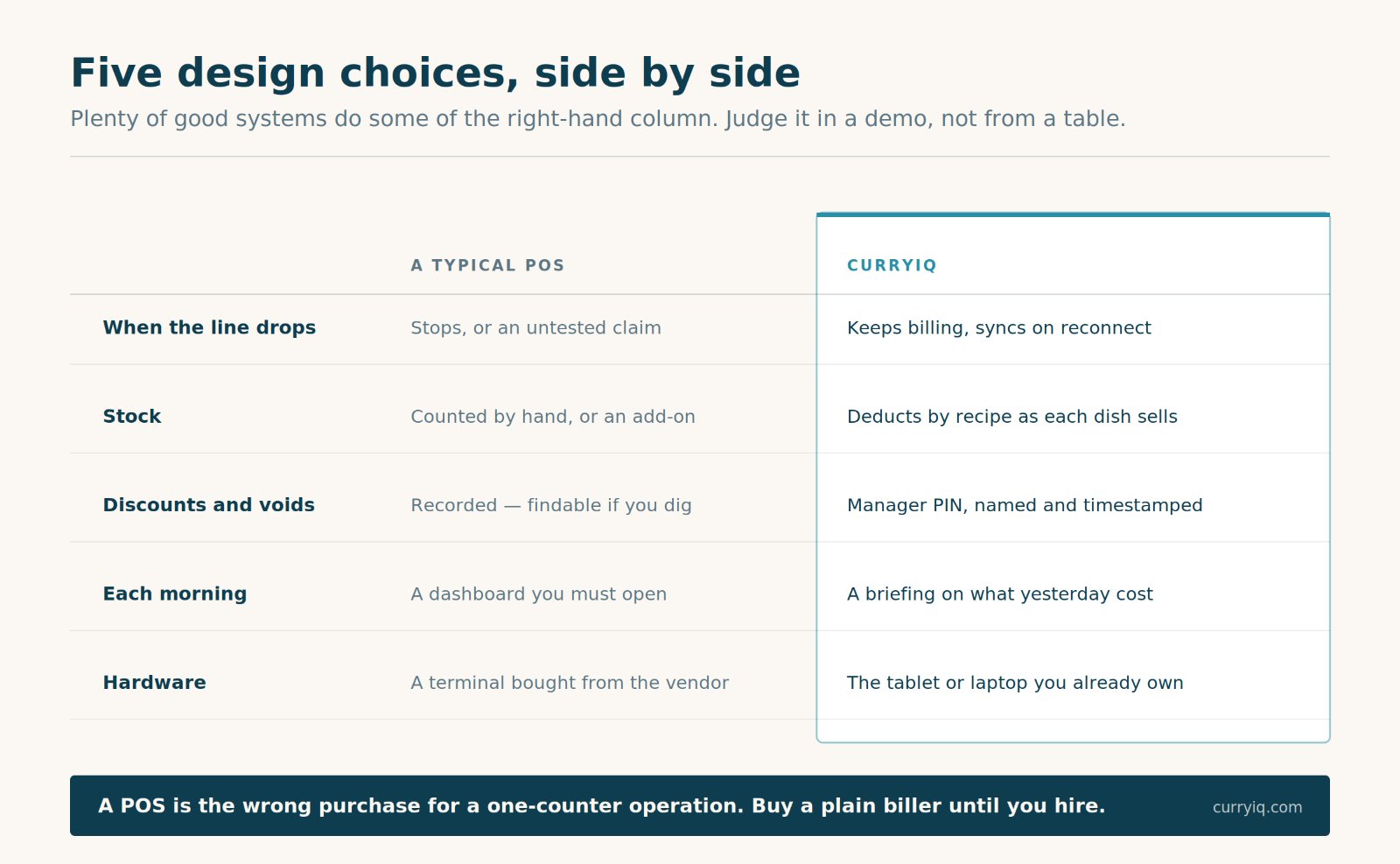
Five design choices. Judge them in a demo rather than taking my word for it.
| A typical POS | CurryIQ | |
|---|---|---|
| When the line drops | Billing stops, or the "offline mode" is a claim you can't test | Billing continues, syncs on reconnect — ask us to unplug it live |
| Stock | Manual counting, or an inventory module sold separately | Deducts by recipe as each dish sells |
| Discounts and voids | Recorded, findable if you export and dig | Manager PIN at the moment it happens, named and timestamped |
| What you get each morning | A dashboard you have to remember to open | A briefing that tells you what yesterday actually cost you |
| Hardware | Often a bundled terminal you buy from the vendor | Runs in the browser on the tablet, laptop or phone you already own |
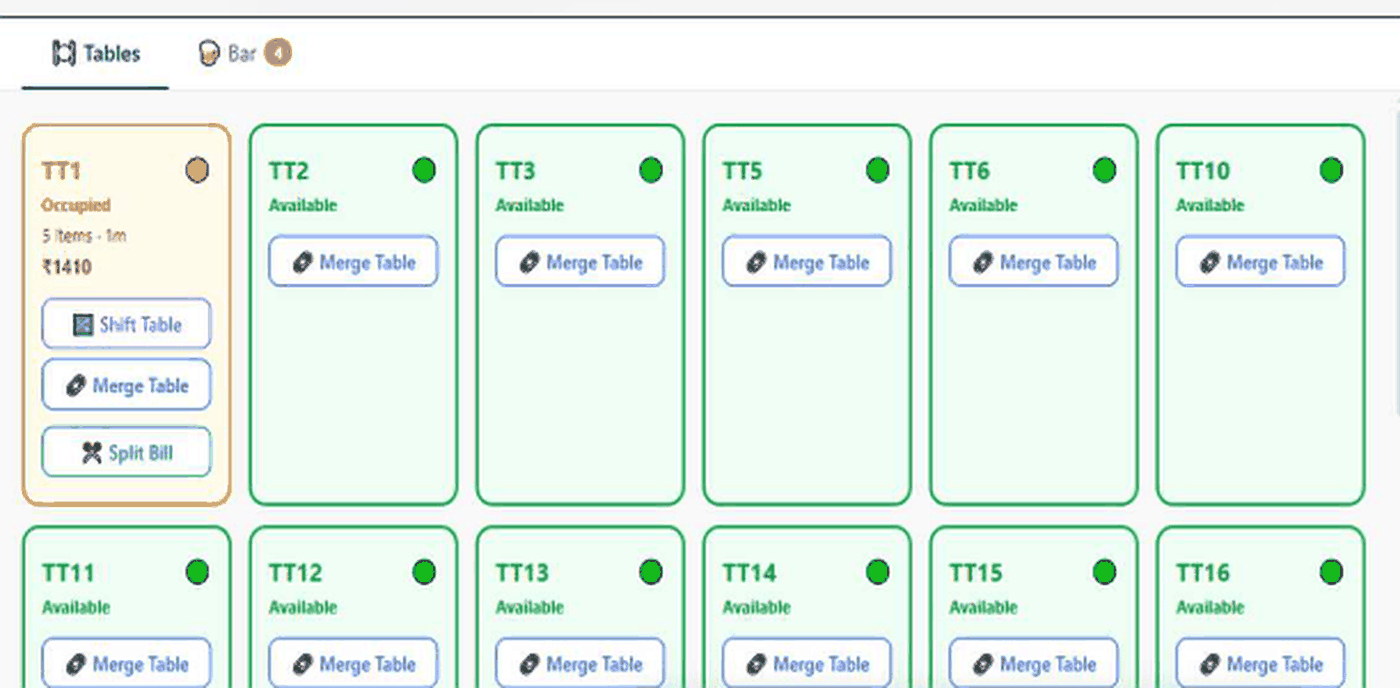
The floor, live: TT1 occupied at ₹1,410 with shift, merge and split-bill sitting on the table card rather than three menus deep. Real screenshot, not a mockup.
Three of those matter more than the others in an Indian restaurant, and they're the ones I'd push on with any vendor, us included:
Offline billing that's real. Offline mode is the difference between a bad evening and a lost evening. In a hill town, in an older market building, on the Saturday the area loses power — this is the feature you'll remember buying.
Stock that moves by itself. A plate of paneer tikka sells and 180g of paneer leaves the ledger. No sack-counting at month end, no calling the gap "wastage". Inventory.
A briefing, not a dashboard. Every POS records what happened. The question is whether anything reads it back to you. CurryIQ's analytics sends a morning summary — thinnest-margin dish, which shift voided most, where food cost moved — without you opening anything.
And the boundary, stated plainly: a POS is the wrong purchase for a one-counter operation. If you're eleven items and you're at the till yourself, a plain compliant biller does the job for a fraction of the money. The moment you hire a second person or put in a table, the maths flips.
Everything it does is listed on the features page; what it costs is on pricing.
How to run a POS demo in 15 minutes
Take this into every demo, ours included. It separates systems faster than any comparison table, because it tests behaviour rather than claims.
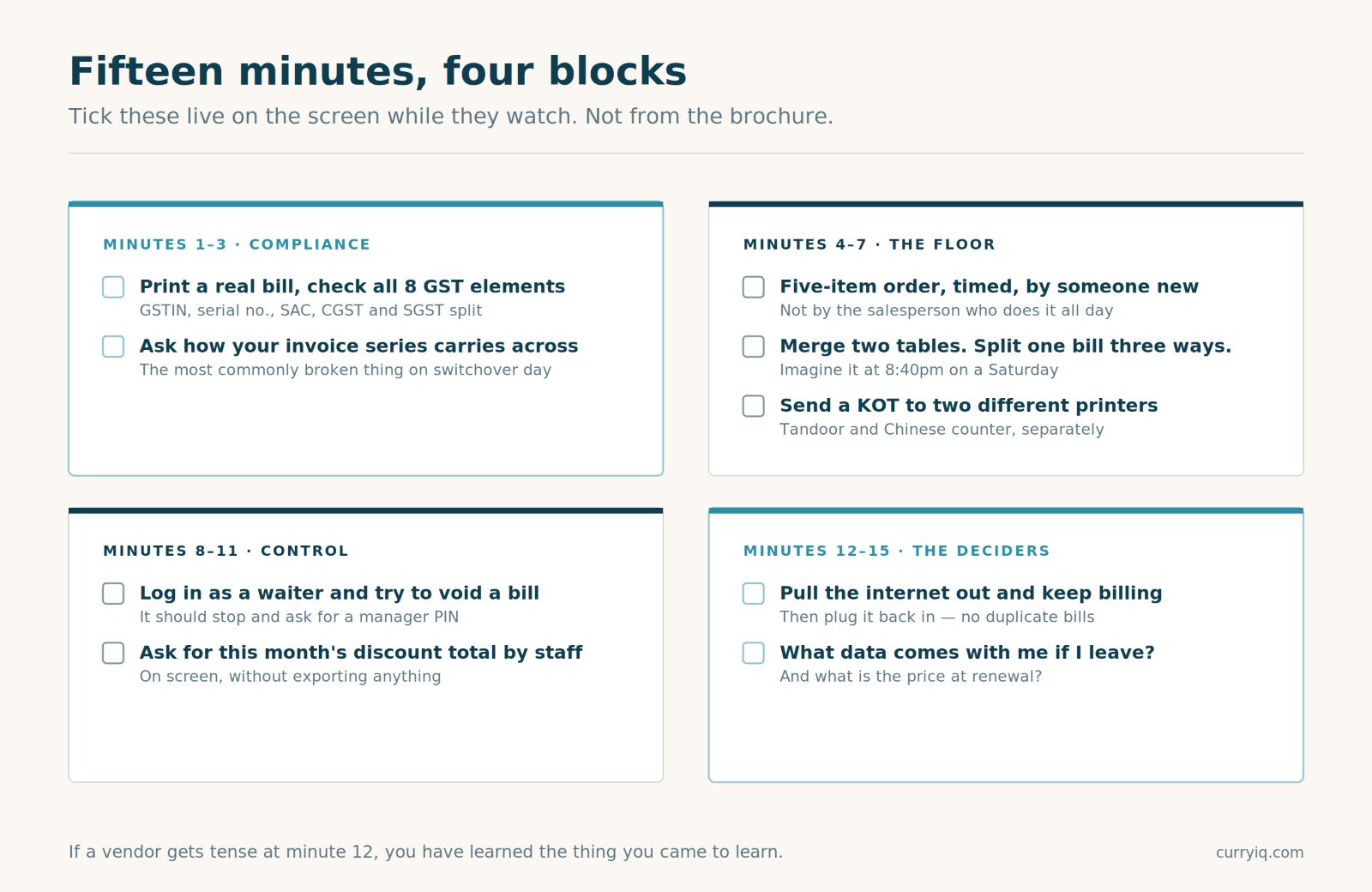
Print this. Tick it live on the screen while they watch.
Minutes 1–3 — compliance
Print a real bill and check it against the eight GST elements. GSTIN, unbroken serial number, SAC code, CGST and SGST split separately. Then ask how your existing invoice series carries across on migration — the most commonly broken thing on switchover day.
Minutes 4–7 — the floor
Punch a five-item order, timed, with someone who has never used the system. Merge two tables. Split one bill three ways. Send a KOT to two different printers. If any of these takes more than a few taps, imagine it at 8:40pm on a Saturday.
Minutes 8–11 — control
Log in as a waiter and try to void a bill. It should stop and ask for a manager PIN. Then ask to see this month's discount total by staff member, on screen, without exporting anything.
Minutes 12–15 — the ones that decide it
Disconnect the internet and keep billing — actually pull the cable, don't accept a description. Reconnect and confirm nothing duplicated. Then ask what data leaves with you in a year, in what format, and what the price does at renewal.
If a vendor gets tense at minute 12, you've learned the thing you came to learn.
What I'd do this week
Not next quarter. This week, and it takes about twenty minutes total.
Monday, before service: open whatever you use now and try to answer three questions. How much did you discount last month? Which dish sells most — and which earns least per plate? What did your last void cost you, and whose login raised it?
If you can answer all three, your current setup is doing its job and you shouldn't switch. Genuinely.
If you can't answer any of them, you've just found the shape of what your software isn't doing. Write the three questions on a piece of paper and take them into your next demo. Don't ask vendors what their POS does. Ask them to answer your three questions using their software, in front of you.
That's a much better meeting than the one they had planned.
Bring those three questions to us first
GST-correct billing, KOT to the right station, table and QR ordering, recipe-level stock, billing that survives the line dropping, and a morning briefing that tells you what yesterday cost you. Free onboarding, a 14-day trial, migration with your invoice series intact, cancel anytime.
→ Start a free trial · See the product
No install, no bundled terminal — it runs in the browser on the tablet already sitting at your counter.
— Sagar, founder, CurryIQ
Frequently asked questions
What is POS software for restaurants?
POS software for restaurants captures an order, sends it to the kitchen as a KOT, produces a GST-compliant bill, records the payment, and stores the data for reporting. Point of sale means the point where an order becomes money — the software's job is to make sure nothing is lost between those two moments.
How much does a restaurant POS system cost in India?
Cloud POS software typically runs ₹500–₹3,000 per outlet per month in 2026, with one-time on-premise licences commonly ₹15,000–₹50,000. Hardware is separate: a thermal printer is ₹4,000–₹9,000 and a tablet ₹12,000–₹25,000, though browser-based systems run on devices you already own. Price is driven by outlets, terminals and whether inventory is included.
What is the difference between billing software and a restaurant POS system?
Billing software's job ends when the bill prints. A POS carries the same order further — kitchen routing before the bill, and stock deduction, approval trails and reporting after it. The bill is one step inside the POS rather than the product itself.
Is free POS software enough for a small restaurant?
For a single counter with a fixed menu and the owner present, yes — provided it prints a GST-compliant bill with an unbroken invoice series. It stops being enough once staff take orders unsupervised, discounts are given at the table, or the kitchen needs KOTs routed to more than one station.
Does restaurant POS software work without internet?
Some does. Cloud-only systems stop when the connection does; hybrid systems keep billing locally and sync when it returns. Vendors are vague here, so ask for a live demonstration with the connection pulled, then check that offline bills sync without duplicating.
What is the difference between a quick service and table service POS?
A quick service restaurant POS system optimises for speed — a fast item grid and one-tap payment. A table service POS optimises for accuracy over a longer order: table maps, running orders, merging tables and splitting bills. Buying the wrong shape means fighting the software every service.
What should I look for in the best POS software for restaurants in India?
GST-compliant billing with an unbroken invoice series, KOT routing per kitchen station, offline billing you have personally tested, a manager PIN on voids and discounts, recipe-level inventory if you carry stock, and a clear answer on data export if you leave. Test all six live in the demo rather than reading a feature list.
Is restaurant management software the same as a POS system?
Mostly, yes. "Restaurant management software" is usually a POS bundled with inventory, purchase records and reporting — the wider label for the same category. If a vendor uses the broader term, ask which modules are actually included in the price you have been quoted.
How long does it take to switch restaurant POS systems?
The technical migration — menu import, tax mapping, staff accounts, invoice series carried across — usually takes a few days and happens outside service hours. Staff becoming genuinely comfortable with a new screen takes one to two weeks. It does not require closing the restaurant.
Keep reading
Ready to try CurryIQ?
Start free. No credit card required. Setup in 10 minutes.